

VOCODINE VST Plug-in
Vocodine VST plugin delivers authentic vocoder effects with consonant isolation, physical tube modeling, and keyboard/auto modes for Windows and macOS.
Original price was: $70.00.$40.00Current price is: $40.00.
Description
Vocodine VST Plugin: Authentic Vocoder Effects with Physical Tube Modeling
If you’ve ever wanted to capture that classic robotic vocal effect that defined decades of electronic music, the Vocodine VST plugin offers a refreshingly direct approach. Unlike many digital vocoders that can sound thin or artificial, Vocodine was carefully crafted to emulate the warm, organic character of physical voice boxes—the kind used on timeless tracks by Kraftwerk, Daft Punk, and countless pop and hip‑hop productions. Developed by blezzbeats, this plugin combines sophisticated signal‑processing techniques with an intuitive interface, giving you a vocoder that feels like a dedicated hardware unit rather than just another software effect.
What sets Vocodine apart is its focus on realism. Through techniques like consonant isolation, physical modeling of plastic tubes, and impulse actuation, the plugin reproduces the nuanced response of analog vocoding hardware. Whether you’re processing vocals, synthesizers, or drum loops, Vocodine maintains a rich, textured quality that sits perfectly in a mix without sounding overly processed. It’s a tool designed for producers who want that iconic “talking synth” sound without spending hours tweaking parameters or layering multiple effects.
How Vocodine Captures the Classic Vocoder Sound
At its core, a vocoder analyzes the frequency content of a modulator signal (typically a voice) and applies those characteristics to a carrier signal (usually a synth). While this concept is straightforward, the devil is in the details. Vocodine implements several key techniques to achieve a more authentic result:
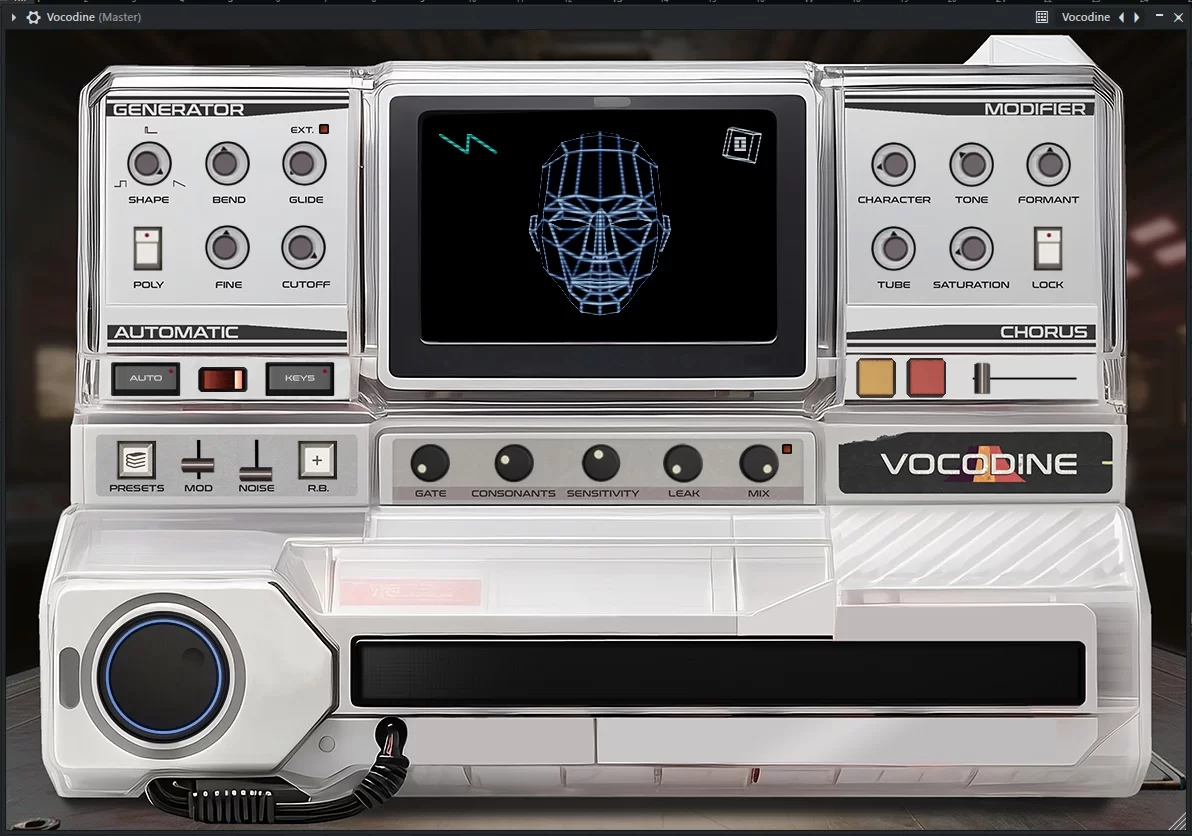
🎤 Consonant Isolation – Intelligently separates plosives and sibilants from sustained vowels, ensuring that speech remains articulate and intelligible even after heavy processing.
🎛️ Physical Tube Modeling – Emulates the acoustic properties of the plastic tubes found in vintage voice‑box units, adding subtle resonances and a warm, rounded tone.
⚡ Impulse Actuation – Recreates the transient response of hardware vocoders, giving processed sounds a more dynamic, punchy attack.
🎹 Dual Operation Modes – Switch between Keyboard mode for precise MIDI control and Auto‑Mode for automatic pitch detection and generation.
🔄 Mono & Polyphonic Options – Use Mono mode for that classic, focused vocoder sound, or enable Poly mode for chords and layered textures.
🎵 Oscillator Blending – Seamlessly mix between square, pulse, and sawtooth oscillators to shape the tonal character of your vocoded signal.
✨ Formant & Tone Controls – Tweak the vocal character, tone, and formant position to match different voices or create entirely new robotic timbres.
🎨 Built‑In Effects – Add drive and saturation via the “hose drive” control, or apply lush, Juno‑style choruses for width and movement.
Keyboard vs. Auto‑Mode: Two Ways to Control Your Vocals
Vocodine offers two distinct workflows to suit different production styles. In Keyboard mode, you connect a MIDI keyboard (or draw notes in your DAW’s piano roll) to control the pitch and articulation of the vocoder in real time. This method is ideal for performances or when you want precise melodic control—every note you play directly shapes the output, allowing for expressive, synth‑like phrasing that follows your musical intentions.
If you prefer a more hands‑off approach, Auto‑Mode lets the plugin analyze the incoming audio and automatically generate appropriate pitches. This is perfect for quickly processing vocal loops or monophonic instruments without setting up MIDI routing. Auto‑Mode still provides controls for sensitivity and range, so you can fine‑tune how the plugin responds to your source material.
Mono Leads or Polyphonic Textures
Another important distinction is between Mono and Polyphonic operation. Mono mode emulates the behavior of traditional hardware vocoders, delivering a focused, single‑note sound that excels for lead vocals, basslines, or percussive phrases. The mono processing adds a sense of weight and presence that cuts through dense mixes.
In Polyphonic mode, Vocodine can process chords and layered sounds, opening up possibilities for pads, atmospheric backgrounds, or complex harmonic movements. This flexibility makes the plugin suitable not only for classic robotic vocals but also for experimental sound design, where you can vocode drums, ambient textures, or full instrumental sections.
Sound‑Design Capabilities Beyond Basic Vocoding
While Vocodine excels at traditional vocal processing, its feature set encourages creative experimentation. The oscillator section lets you blend between square, pulse, and sawtooth waves, which means you can generate the carrier signal internally rather than relying on an external synth. This is especially useful when you want a vocoded effect but don’t have a dedicated synth track available.
The “hose drive” control adds harmonic saturation, mimicking the gentle overdrive that occurs when pushing a physical tube. Combined with the Juno‑style chorus (which can be applied in mono or stereo), you can achieve anything from subtle thickening to wide, swirling modulation. Real‑time parameter automation is fully supported, so you can evolve the sound over time—for instance, gradually increasing the drive for a crescendo effect or sweeping the formant to create morphing vocal textures.
Add Vocodine to Your Vocal‑Processing Toolkit
Experience authentic vocoder effects with physical tube modeling, consonant isolation, and flexible keyboard/auto‑modes—all in a CPU‑friendly VST/AU/AAX plugin for Windows and macOS.
Compatibility & System Requirements
Vocodine is available as VST2, VST3, and AAX on Windows, and as VST2, VST3, AU, and AAX on macOS. The plugin requires a sample rate of 44.1 kHz or 48 kHz—this ensures optimal performance and avoids aliasing artifacts. Below are the detailed system requirements:
- Windows: Windows 7 SP1 or later (64‑bit only). Tested with Ableton Live, FL Studio, Maschine, Pro Tools, Cubase 13, Bitwig, Reaper, Studio One, Reason, and Luna.
- macOS: macOS 10.13 (High Sierra) or later, including support for Apple Silicon (ARM). Earlier macOS versions may work but are not officially supported. Tested with Logic Pro X, Ableton Live, Pro Tools, and other major DAWs.
Because Vocodine is relatively light on CPU, you can run multiple instances in a project without straining your system. The interface is resizable and retina‑ready, so it looks sharp on high‑dpi displays.
Frequently Asked Questions
Expand Your Vocal Effects Collection
If you’re looking to build a comprehensive vocal‑processing setup, consider pairing Vocodine with other specialized effects. Browse our VST effects category for dedicated pitch‑correction tools, reverbs, delays, and compressors that can further enhance your vocals. For more robotic and synthetic vocal textures, check out our selection of vocoder and talk‑box plugins.
To learn more about Vocodine’s development and hear audio examples, visit the blezzbeats official website. For a deeper dive into vocoder history and techniques, Sound on Sound’s vocoder guide provides excellent background and practical tips.
Achieve Classic Robotic Vocals with Vocodine
With its physical tube modeling, consonant isolation, and flexible mono/poly operation, Vocodine delivers the warm, articulate vocoder sound that producers have sought for decades. Whether you’re processing lead vocals, creating synth‑like basslines, or experimenting with atmospheric textures, this plugin provides an authentic, easy‑to‑use solution that fits right into your creative workflow.
Note: Vocodine is a digital product. After purchase, you’ll receive instant download instructions and a license key for activation. The plugin requires a sample rate of 44.1 kHz or 48 kHz. Compatible with Windows 7+ (64‑bit) and macOS 10.13+ (Intel & Apple Silicon).


Phanmen –
Great vocoder!
Nazarico –
Working perfectly