

Crowd Track VST Review: Honest Take on Gospel Producers’ Crowd Plugin
This Crowd Track VST Review is for people who finish Sunday tracks on a laptop and still hear a rehearsal. The click is solid. The band sounds fine. Then the last chorus hits and nobody claps. That gap is why I loaded Gospel Producers’ crowd plugin instead of fishing through film SFX folders again.
Crowd Track VST gives you applause, crowd texture, and cue drops without hiring a room. 50+ samples, 6 layers, 70+ presets, 20+ triggers. $79 down to $40. Score 8.6/10 if you want speed. Skip it if you need to design crowds from scratch. Listing: Crowd Track VST on Melodyz.
Sunday tracks that still sound empty
I build a lot of playback sessions at home. Stems are tight. Then I bounce the last chorus and it feels like a practice room. Fake crowds usually make that worse, because they sound like a talent-show button. I still wanted a live audience VST for worship that I could trigger in Ableton or Logic without a 2 GB SFX hunt.
So the question in this Crowd Track VST Review is practical. Can a $40 plugin make a backing track feel congregational, or does it just add noise? I came in skeptical. I left with it on a dedicated track, muted on verses, and riding the last lift.
What you actually get
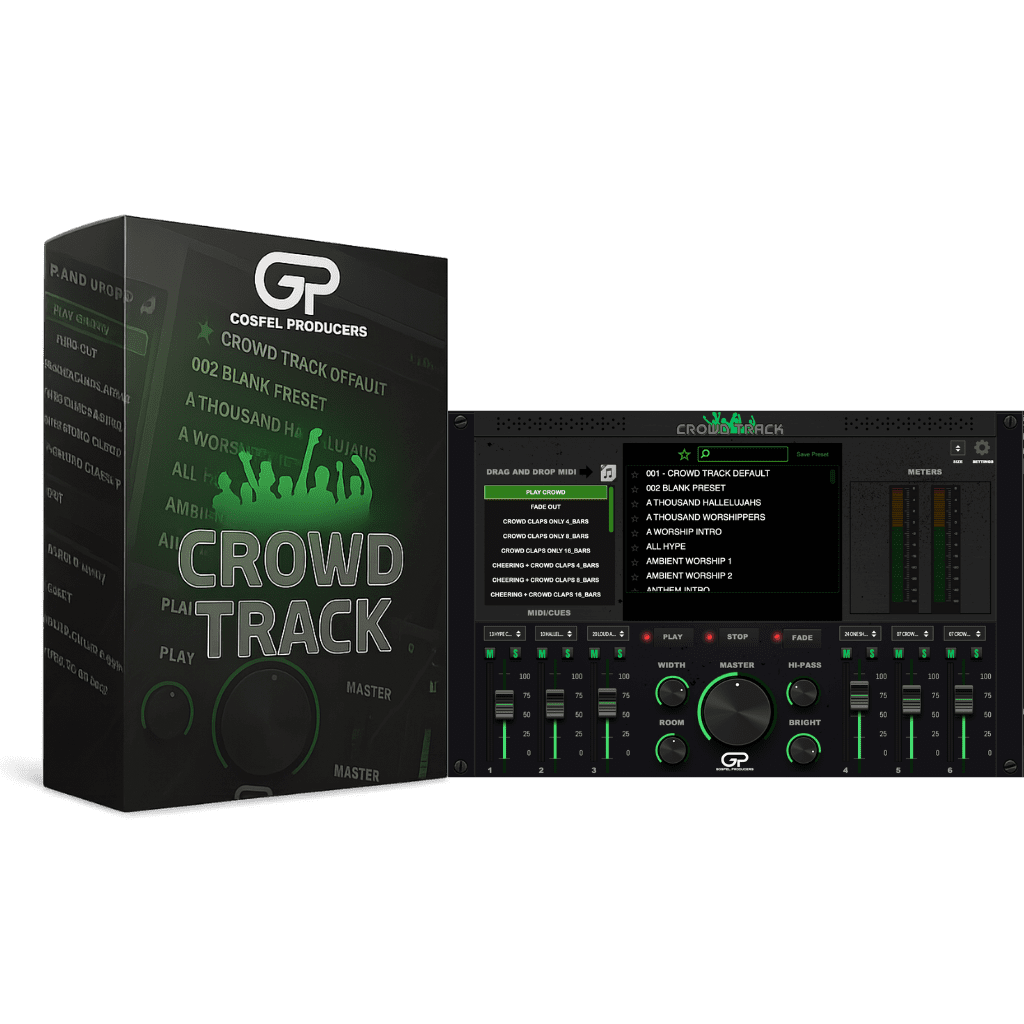
Crowd Track is a live crowd atmosphere plugin. Drop it on a track. Then add applause, movement, and short reactions around music you already mixed. Because the controls include width, room, brightness, and FX, you can keep a bed tucked, then open it when the song needs air.
The library is 50+ samples, a 6-layer workflow, 70+ presets, and 20+ cue triggers. That is more than a folder of claps, although it is still a sample instrument. Gospel Producers sell it for $79 and currently $40. For gospel production plugins aimed at church work, that price is the easy part. Taste is the hard part.
The Melodyz listing is here: Crowd Track VST live crowd atmosphere plugin. If you are still shopping, the VST Plug-ins collection is the next aisle.
Why this shop made a crowd plugin
John Mike built Gospel Producers for church musicians who were tired of patches that sounded like leftover pop banks. Loop Track is their free drum-loop tool and users rate it 5/5. Guide Track covers live cues. Peculiar Sounds V2 is the keys instrument. Loop Elements Pro is the loop writer I already reviewed. Juice by DLO is the session-sound plugin. Crowd Track is the room.
A generic pack records a concert. These people hear how a congregation answers a worship leader. That does not magically make every sample perfect. It does mean the plugin was aimed at the job I actually have. For the loop side of the same catalog, see the Loop Elements Pro VST review.
Install, UI, and whether it feels like live gear
You load a preset, stack a layer, then place cues. There is no spectrogram sandbox. If you wanted to draw a crowd from a single clap, this is the wrong window. If you have a Sunday deadline, the layout makes sense.
It supports AU, VST3, and AAX on compatible hosts. Windows and macOS, Intel and Apple Silicon. Minimum 4 GB RAM and a 1280 x 1024 display. Steinberg’s notes on the VST3 standard are enough if you care about the format. Scanning it in was boring, which is what I want from a plugin install.
I would call it a studio insert that also survives a playback rig. Seventy presets can tempt you into an arena sound on a small-church ballad. Don’t. Listen in context. A huge crowd on a quiet verse is how people catch you.
How the crowd holds up
The applause has body. It does not sparkle like TV clapping. Congregation density is closer than concert density, which is why I would use it on gospel and worship records. Ride it. A swell after a tag, then a fade, sounds like people. A constant bed sounds like a loop.
Chants will split a room. Some sit in a gospel pocket. Some feel like a sports crowd walked into service. I used short shouts. I muted long loops unless the song was already call-and-response. If the lyric would never get that yell, cut it.
Layering is the only reason this beats a WAV folder. Six layers plus triggers let the crowd follow the arrangement. If you pick one loop and walk away, you will hear the fake. Width and room knobs help it sit around the vocal. Brightness too, because a harsh crowd fights the lead’s air.
You cannot rebuild your sanctuary. You cannot go as deep as Crowd Chamber. After a few albums, some reactions repeat. If authenticity is the whole brief, record the room. Plugins do not replace people who were actually there.
Laptop workflow that did not fight me
On a dry live take, I used a thin applause layer and two cues on the lifts. On a backing track, I kept verses empty on purpose, then let Crowd Track bloom on the last chorus. On a studio choir bounce, I treated it like extra room, not extra choir. CPU stayed light. Sample playback is cheap. I would still freeze the track before a long playback set if the machine is old.
Compared with recording a congregation, this is faster and less honest. Compared with random SFX, the tone is closer to church. Compared with stacking unison plugins by hand, you lose design range and you get your evening back.
Crowd Track VST Review vs cheaper SFX folders
Crowd Chamber is a design toy. Feed it a vocal, get a crowd-ish smear, up to a wild layer count. It will not hand you church claps before service. Boom Library Crowd Concert Audiences is built for post, not music. Native Instruments’ Jacob Collier Audience Choir is free singing on Kontakt. Different job.
I would buy Crowd Track for this niche because it is $40, it sits in the DAW, and I can place cues without conforming film files. It is not the best crowd simulation VST if you want to invent crowds. It is the one I would finish a Sunday track with.
Buy or skip
- Get it if you produce worship, gospel, choir records, or live stems and you need crowd energy without scheduling a room.
- Skip it if you only work from field recordings, or if you need a crowd that matches one sanctuary and no other.
- Keep the fader low. Place cues on purpose. Do not wallpaper the whole mix.
Score: 8.6/10. For forty dollars, this Crowd Track VST Review ends on a yes with conditions. Seasoning helps. A constant loop does not.
Get Crowd Track VST on Melodyz
If you already tried Crowd Track on a Sunday track, tell me whether you kept it under the whole mix or only the last chorus. I am collecting the ugly versions.
