

Notonik V2 VST Review: Honest Take on the Chord Rompler Beatmakers Keep Using
Notonik V2 = 312 chord-ready rompler presets for producers who hate dead stock sounds. Includes Subs bass companion. Big install, limited deep design. 8.6/10 for beatmakers. See: Notonik V2 on Melodyz.
Introduction: Finding Chords That Don’t Sound Stock
Here’s the problem nobody romanticizes: your drums slap, your melody is half-formed, and every chord bank you try sounds either plastic or tired. You’re not asking for magic — you want harmony with taste.
In this Notonik V2 VST Review, I’m judging Notonik 2 the way I judge anything that ends up under a vocal: does it speed up writing, and does it still sound credible after compression, 808s, and a topline? Short answer — yes for most beatmakers, with clear limits if you expect a full synth.
What is Notonik V2?
Notonik V2 is a virtual instrument built as a chord-based rompler. Rompler means the heavy lifting is curated samples and designed presets, not open-ended synthesis. The mission is immediate inspiration: chord progressions, pads, plucks, keys, and textures that feel closer to a finished beat than a demo tone.
You get 312 presets spanning Basses, Pads, Plucks, Synths, Keys, Chord Shots, Chord Progressions, and Textures. Available as VST, VST3, and AU on Mac/Windows. Check related tools under VST instruments. Full product with expansions lives here: Notonik V2 VST Plugin + Expansions.
First Impressions & Interface
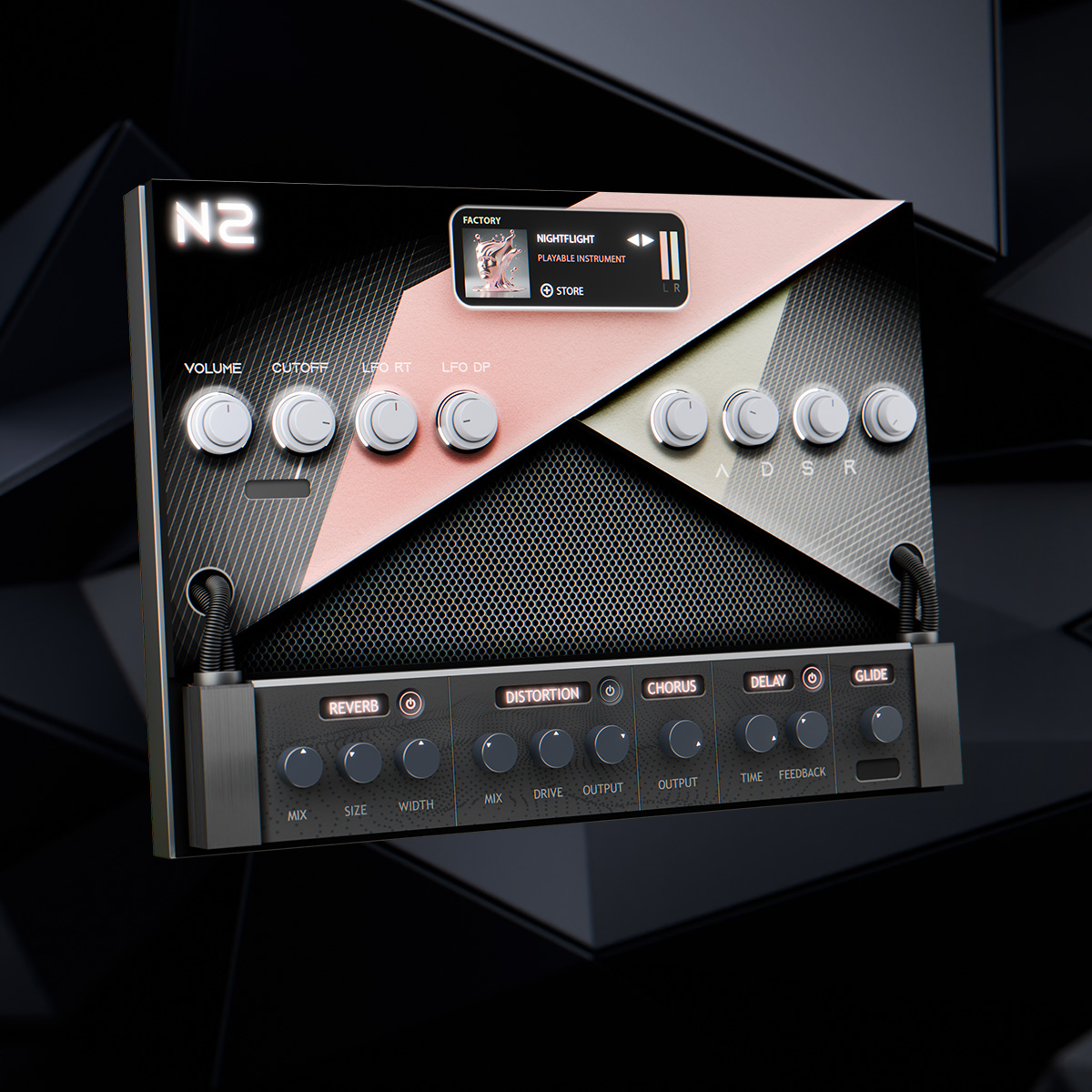
The interface is stripped back on purpose. Minimalistic controls keep the focus on auditioning and playing — which matches how beat sessions actually work when the idea is hot for 90 seconds.
Plan disk space. Expect about 7GB compressed and near 10GB installed for the core library (expansions add more). External library storage is supported. 4GB RAM is the floor; I’d run more if you’re stacking modern plugins around it.
Sound Quality & Preset Deep Dive
The Strong Categories
Basses feel thick without eating the whole mix. Chord Shots are the grab-and-go folder, especially useful when you need a hip-hop pocket before the vocalist arrives. Textures give modern color: airy, slightly degraded, emotionally useful.
I care less about how a patch sounds solo and more about whether it still holds after the 808 lands. Notonik’s better presets clear that bar, which is probably why beatmakers keep passing it around.
Pop, Hip-Hop, EDM Use Cases
Hip-hop: Chord Shots + Keys for hooks. Pop: Pads and progressions for quick demo beds. EDM: Textures/Synths for intro atmosphere and soft drops. You’re not replacing Serum for lead design — you’re covering the harmonic and textural foundation faster.
Subs: The Free Bass Companion
For a quick listen outside the DAW, this YouTube demo shows the vibe of the factory bank.
Subs packs 30 bass sounds from the Notonik V2 library into a free plugin. Distortion with linked Gain and Drive, master gain, Chorus, Glide (Poly/Mono/Legato), and cutoff filters (HP/LP) give enough control to shape low end without opening a full synth. Smart gateway into the Notonik ecosystem.
Expansions in the Bundle
MIRAGES, 24K, BURN, PORTAL, HOSHI DREAMS, ABYSS, VYBEZ, and CHAOS KIT expand the palette — dreamy, polished, aggressive, abstract, or drum-heavy depending on the pack. Most add playable instruments and chord progressions, keeping the same writing style as the core Notonik 2 presets.
What Doesn’t Work as Well
Deep sound design? Limited. If your identity is building everything from oscillators, this will feel like training wheels. Some progressions share a similar harmonic personality. The install isn’t small. And “Notonik V2 free download” Google bait is a waste of time — cracked copies and broken libraries aren’t a workflow.
Performance & Workflow
On CPU, Notonik behaved like a well-behaved sample instrument in Logic and Ableton. FL Studio users should stick to VST3 and sensible buffers; sample instruments can hiccup if the host is starving for disk or RAM.
In practice it shortens the gap between “idea” and “loop I can send.” That alone justifies the slot in a beatmaker template.
Notonik V2 vs. The Competition
Scaler and Captain Chords win on theory guidance. Stock DAW instruments win on price. Notonik wins when you want a Notonik chord rompler that sounds produced before you touch EQ. For many producers hunting the best VST for chord progressions with character, that’s the deciding factor.
Pros & Cons
Verdict & Final Score — Notonik V2 VST Review
For: Bedroom producers, full-time beatmakers, anyone who needs fast, credible chord beds.
Not for: Patch designers who refuse factory content, or producers who already own overlapping chord libraries they actually open every week.
Final score: 8.6/10. Notonik V2 won’t reinvent your sound design skills. It will help you lock a usable harmonic bed before the idea dies.
Have you loaded Notonik V2 yet? Comment with your go-to category — I’m curious whether Chord Shots or Pads win your sessions.
