
Wavesfactory Trackspacer 2: Intelligent Frequency Carving Tool
Wavesfactory Trackspacer 2 creates mix clarity through intelligent frequency carving, analyzing sidechain signals to reduce only conflicting frequencies.
Original price was: $70.00.$35.00Current price is: $35.00.
Description
Wavesfactory Trackspacer 2: Professional Frequency Management for Clearer Mixes
When elements in your mix compete for the same frequency space—vocals buried under guitars, kick drums lost in basslines, or leads obscured by pads—Wavesfactory Trackspacer 2 delivers intelligent frequency carving that creates clarity without traditional sidechain pumping. This specialized plugin analyzes your sidechain signal and applies an inverted EQ curve to conflicting tracks, temporarily reducing only the problematic frequencies rather than the entire signal. Whether you’re mixing vocals, drums, or complex instrumental arrangements, Trackspacer 2 provides the surgical precision that professional engineers value for achieving separation without sacrificing musicality.
What makes Trackspacer 2 particularly effective is its focused approach to a specific mixing problem: frequency masking. Unlike traditional sidechain compression that ducks entire tracks (creating obvious pumping effects), Trackspacer 2 surgically carves only the frequencies that conflict with your sidechain source. This means your guitars keep their body and character, your bass maintains its weight, and your mixes achieve professional clarity without artificial-sounding processing artifacts.
Complete Trackspacer 2 Feature Set
- ðŸŽ›ï¸ Intelligent frequency carving based on sidechain analysis
- 🌀 Single-knob Amount control for immediate results
- 🌊 Advanced filter controls for surgical precision
- 🎵 Real-time signal analysis adapting to dynamic material
- âš¡ Transparent processing without audible artifacts
- 🔄 Full DAW compatibility with sidechain functionality
- ✨ Version 2.5.10 with latest optimizations
- 🔊 Two-computer license for studio and laptop
How Intelligent Frequency Carving Works
Trackspacer 2 operates on a simple but powerful principle: analyze the sidechain signal, identify its frequency content, and apply an inverted EQ curve to the processed track. When your vocal (sidechain) contains energy at 1kHz, Trackspacer 2 reduces 1kHz in the guitar track (processed). When the vocal stops, the guitar returns to full frequency response. This targeted approach creates space for lead elements without the obvious pumping of traditional sidechain compression.
The plugin continuously analyzes your sidechain signal in real-time, adapting to dynamic material like expressive vocals or evolving synth pads. This ensures consistent results regardless of performance variation—a crucial advantage over static EQ cuts that can’t respond to changing source material. The processing remains transparent, avoiding the phase issues and artifacts that can plague aggressive multiband compression.
Practical Mixing Applications
Vocal Clarity Enhancement: Place Trackspacer 2 on your rhythm guitar bus with the vocal track as sidechain input. The plugin automatically carves frequencies from the guitars that conflict with vocal presence, making lyrics intelligible without reducing overall guitar level. This approach maintains the guitar’s full body while creating dedicated space for vocal articulation.
Kick Drum and Bass Separation: Sidechain your bass track to the kick drum. Trackspacer 2 reduces conflicting low-mid frequencies in the bass when the kick hits, then returns them immediately after. This eliminates low-end muddiness without creating the unnatural pumping of traditional bass sidechaining. Both elements maintain their impact while avoiding frequency competition.
Lead Instrument Focus: Create space for piano solos, synth leads, or instrumental melodies by carving conflicting frequencies from backing tracks. The advanced filter controls allow you to focus the carving on specific frequency ranges—for example, only reducing mid-range frequencies in pads without affecting their atmospheric highs or foundational lows.
Intuitive Controls and Advanced Features
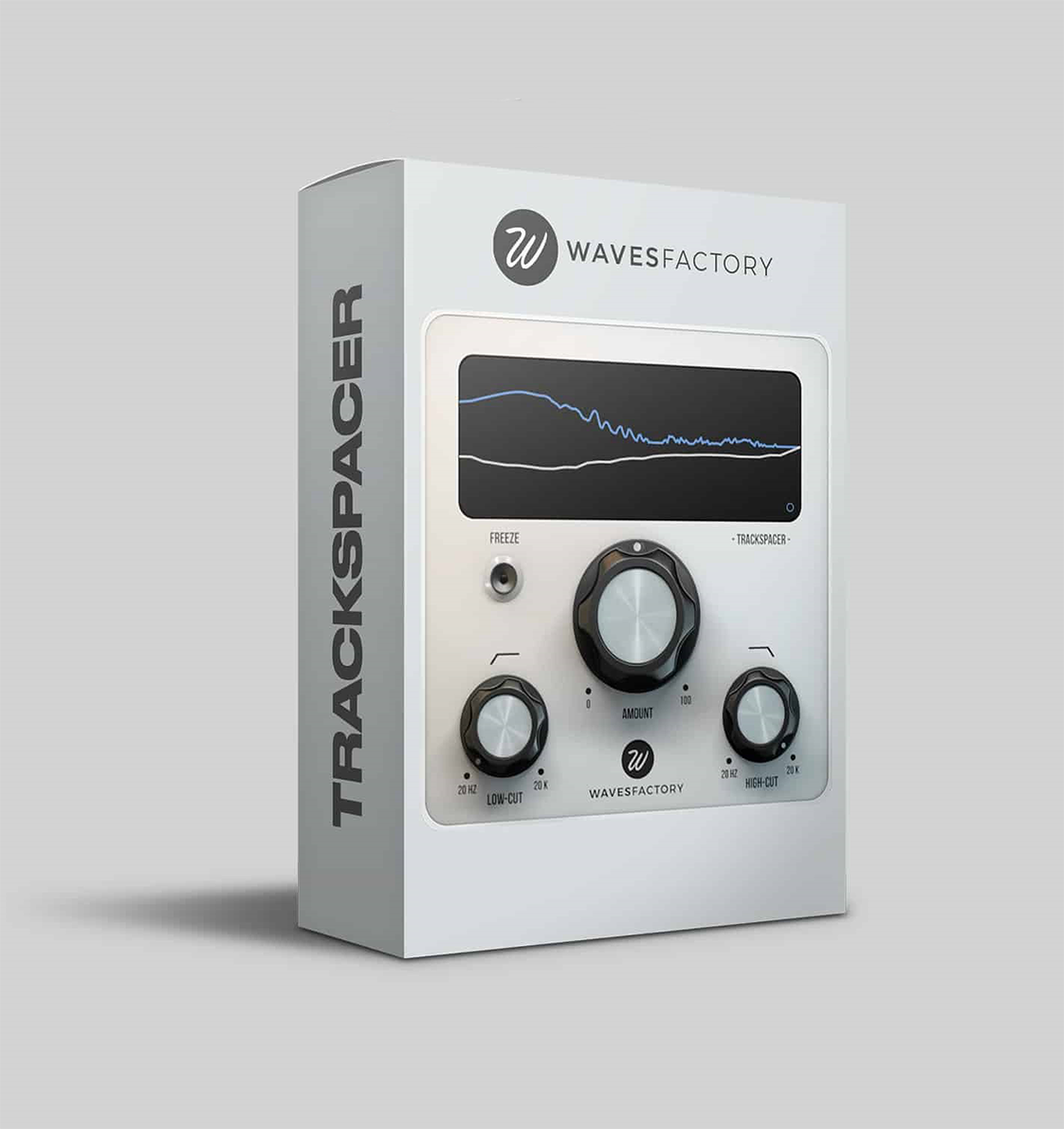
The main Amount knob provides immediate control over processing intensity—turn clockwise for more aggressive carving, counter-clockwise for subtle enhancement. This single control delivers professional results without complexity, making Trackspacer 2 accessible to producers at any experience level. The intuitive design means you hear improvements within minutes rather than requiring extensive parameter tweaking.
For surgical applications, the advanced panel reveals low-cut and high-cut filters that focus the processing on specific frequency ranges. Need to carve only mid-range frequencies without affecting lows or highs? Adjust the filters accordingly. The visual feedback shows exactly which frequencies are being affected, providing transparency about the processing without requiring spectral analysis elsewhere in your chain.
Technical Specifications
- Platform: Windows 7+ & macOS 10.9+
- Formats: VST, VST3, AU, AAX (64-bit)
- Version: 2.5.10 (latest stable release)
- Processing: Real-time frequency analysis
- Controls: Amount knob + advanced filters
- License: 2 computers, no subscription required
- CPU: Optimized for efficient operation
- DAWs: All with sidechain functionality
Workflow Integration and Compatibility
Trackspacer 2 integrates seamlessly into modern DAW workflows, working with any host that supports sidechain functionality including FL Studio, Ableton Live, Logic Pro, Cubase, Studio One, Reaper, Reason, and Pro Tools. The plugin recalls its settings when reopening projects, ensuring consistent results across mixing sessions. Version 2.5.10 includes native Apple Silicon support alongside Intel compatibility, ensuring optimal performance on modern Mac systems.
The license allows installation on two computers (typically studio workstation and laptop for mobile work) without requiring third-party copy protection like iLok. This practical approach respects professional workflows while providing necessary copy protection. Free updates for the Trackspacer 2 version ensure ongoing compatibility with new operating systems and DAW releases.
Complementary Mixing Tools
While Trackspacer 2 excels at frequency carving, pairing it with other specialized mixing tools can further enhance your results. For overall mix bus processing, consider mastering-grade compression and limiting plugins. For additional frequency control beyond dynamic carving, surgical EQ plugins can address static frequency issues that Trackspacer 2’s dynamic processing complements rather than replaces.
To explore more about Trackspacer 2’s technical details and see it in action, visit the official Wavesfactory product page for tutorials, user examples, and detailed specifications. The video demonstration below showcases Trackspacer 2’s capabilities across various mixing scenarios:
Achieve Professional Mix Clarity
Join engineers worldwide who rely on Wavesfactory Trackspacer 2 for intelligent frequency management. At just $35 (regularly $70), you’re getting professional mixing results at 50% savings with no subscription required.
Intelligent frequency carving • Single-knob control • 2-computer license • Windows & macOS