

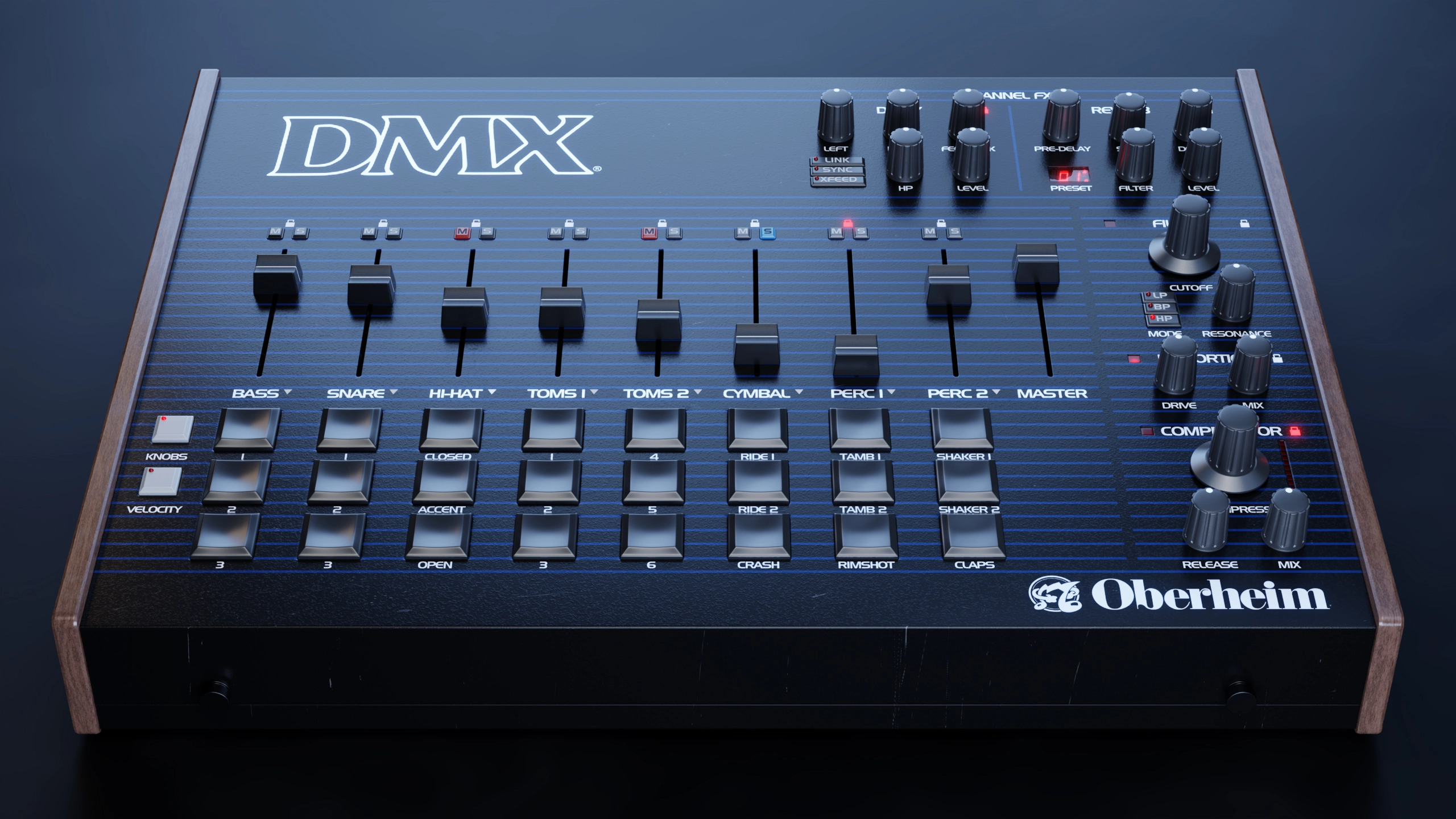
Oberheim GForce DMX VST Plug-in
Oberheim GForce DMX VST plugin delivers authentic DMX drum machine sounds with modern controls, filter, distortion, and compression for Windows and macOS.
Original price was: $62.00.$35.00Current price is: $35.00.
Description
Oberheim GForce DMX VST Plugin: Authentic Drum Machine Sounds with Modern Control
When the Oberheim DMX drum machine hit the scene in the early 1980s, it quickly became a staple in studios worldwide, providing the rhythmic backbone for countless classic tracks across pop, hip‑hop, electronic, and new wave genres. The GForce DMX VST Plugin captures the essence of that iconic hardware while adding the convenience and flexibility of software. This isn’t just a sample pack—it’s a full‑featured drum instrument that gives you individual control over each sound’s pitch, decay, pan, effects sends, and more, all within a sleek, modern interface.
GForce has meticulously sampled the original DMX sounds (including the 1981 and 1983 revisions) and supplemented them with sounds from the Oberheim DX and Sequential Drumtraks, creating a comprehensive library that covers the classic drum machine palette. Beyond the raw samples, the plugin includes professionally produced kits that are mix‑ready, as well as “raw” kits that let you apply your own processing. With per‑channel controls, a master filter, distortion, compressor, and built‑in delay and reverb, the DMX plugin bridges vintage character and contemporary production needs.
Why the Oberheim DMX Remains Relevant Today
The DMX’s sound is instantly recognizable: punchy kicks, snappy snares, crisp hi‑hats, and distinctive percussion like the iconic “click” and “cowbell.” These sounds defined hits from New Order’s “Blue Monday” and Run‑D.M.C.’s “It’s Like That” to Madonna’s “Holiday” and Phil Collins’ “Sussudio.” By preserving the original sonic character while providing modern control, the GForce DMX plugin allows today’s producers to tap into that timeless vibe without being limited by the hardware’s constraints.
Whether you’re producing retro‑inspired pop, lo‑fi hip‑hop, or electronic music that nods to the 80s, the DMX plugin offers a authentic foundation. The included MIDI files—classic patterns that reference famous beats—give you a creative jumpstart, while the flexible sound‑shaping tools let you tailor each element to fit your track perfectly.
🥁 Authentic DMX Sound Library – Includes all original DMX sounds from 1981 and 1983, plus Oberheim DX and Sequential Drumtraks samples.
🎵 Per‑Channel Controls – Independent pan, solo, mute, pitch, decay, delay send, and reverb send for each of the eight parts.
🎛️ Master Processing – Multi‑mode filter, distortion, and compressor on the master bus for shaping the overall drum mix.
✨ Built‑In Effects – Analog‑style delay and lush reverb on each channel, with send controls for creating space and depth.
🎨 Ready‑Made & Raw Kits – Choose from professionally produced kits that are mix‑ready, or raw kits that let you apply your own processing.
⚡ Classic MIDI Patterns – A collection of iconic drum patterns inspired by famous tracks, ready to drag and drop into your DAW.
🔄 Cross‑Platform Compatibility – Works on Windows and macOS as VST, AU, and AAX, supporting all major DAWs.
📈 Low CPU Footprint – Optimized engine ensures smooth performance even with multiple instances and complex processing.
Sound Library and Kit Design
The core of the plugin is the sound library, which includes every sound from the original Oberheim DMX drum machine. GForce went a step further by adding samples from the Oberheim DX (a later, more affordable model) and the Sequential Drumtraks (a similar‑era machine), giving you a broader palette of vintage drum sounds. The library is organized into kits that cater to different workflows:
- Raw Kits: These present the samples with minimal processing, preserving the original character of the hardware. They’re ideal if you want to apply your own EQ, compression, and effects.
- Produced Kits: These kits have been processed with EQ, compression, and subtle effects to sit well in a mix right out of the box. They’re perfect for quick inspiration or when you need a polished sound without extra work.
Each kit consists of eight parts: kick, snare, closed hi‑hat, open hi‑hat, click, cowbell, tambourine, and crash. These are the same eight voices available on the original DMX, but now you have individual control over each sound’s parameters—something the hardware never offered.
Per‑Channel Controls and Effects
One of the most powerful aspects of the GForce DMX plugin is the per‑channel control panel. For each of the eight parts, you can adjust:
- Pitch: Tune the sound up or down over a wide range, allowing for 808‑style kick drops or creative pitch‑shifted snares.
- Decay: Control the length of the sound, from short, tight hits to long, sustained tones.
- Pan: Position the sound anywhere in the stereo field.
- Delay Send: Route a portion of the sound to an analog‑style delay with time and feedback controls.
- Reverb Send: Send the sound to a lush, spacious reverb for depth and atmosphere.
- Solo & Mute: Isolate or silence individual channels during playback or programming.
These controls let you tailor each drum sound to fit your track precisely, something that would require multiple effect processors if you were using the original hardware or plain samples.
Master Processing for Overall Cohesion
On the master bus, the plugin provides three key processors: a multi‑mode filter, a distortion unit, and a compressor. The filter can be set to low‑pass, high‑pass, or band‑pass, with adjustable cutoff and resonance. This is useful for sweeping effects during transitions or for taming high‑end harshness. The distortion adds harmonic saturation, from subtle warmth to aggressive grit, helping drums cut through a dense mix. The compressor glues the drum mix together, adding punch and controlling dynamics.
Together, these master tools allow you to shape the overall character of the drum kit without needing to insert separate plugins on the channel strip. It’s an all‑in‑one solution that speeds up your workflow.
Add the Oberheim DMX to Your Drum Toolkit
Get authentic DMX drum machine sounds with per‑channel controls, master processing, and ready‑made kits—all in a VST/AU/AAX plugin for Windows and macOS.
Compatibility & System Requirements
The GForce DMX plugin is available as VST, AU, and AAX formats, ensuring compatibility with virtually all modern DAWs on Windows and macOS. The plugin is optimized for efficient CPU usage, allowing multiple instances in a project. Detailed requirements:
- Windows: Windows 7 or later (64‑bit). Compatible with Ableton Live, FL Studio, Cubase, Studio One, Reaper, Bitwig, Pro Tools, and other VST/AAX hosts.
- macOS: macOS 10.9 or later (Intel & Apple Silicon). Compatible with Logic Pro, Ableton Live, Cubase, Studio One, Pro Tools, and other AU/VST/AAX hosts.
The plugin supports sample rates up to 192 kHz and includes oversampling options for cleaner high‑frequency content. The interface is fully resizable and retina‑ready.
Frequently Asked Questions
Expand Your Drum Production Toolkit
If you’re looking to build a comprehensive drum‑production setup, consider pairing the DMX plugin with other drum machines and samplers. Browse our VST instruments category for more drum machines, sample‑based plugins, and percussion libraries. For effects that can further shape your drum sounds, check out our VST effects collection.
To learn more about the DMX plugin’s development and hear audio demos, visit the GForce official website. For a deeper dive into classic drum machine techniques, MusicRadar’s drum machine programming guide offers practical advice.
Bring Classic Drum Machine Vibes to Your Productions
With authentic DMX sounds, per‑channel controls, master processing, and ready‑made kits, the Oberheim GForce DMX VST Plugin gives you the iconic drum machine character with the flexibility of modern software. Whether you’re programming retro beats, layering percussion, or seeking instant inspiration, this plugin delivers timeless rhythm tools that fit seamlessly into your workflow.
Note: The Oberheim GForce DMX VST Plugin is a digital product. After purchase, you’ll receive instant download instructions and a license key for activation. The plugin requires an internet connection for initial activation. Compatible with Windows 7+ (64‑bit) and macOS 10.9+ (Intel & Apple Silicon).

Reviews
There are no reviews yet.