
Celemony Melodyne 5 Studio VST Plugin
Celemony Melodyne 5 Studio VST3 Plugin delivers professional polyphonic pitch correction, timing editing, and sound design for PC and Mac.
Original price was: $600.00.$35.00Current price is: $35.00.
Description
Celemony Melodyne 5 Studio — Professional Pitch & Timing Correction for PC & Mac
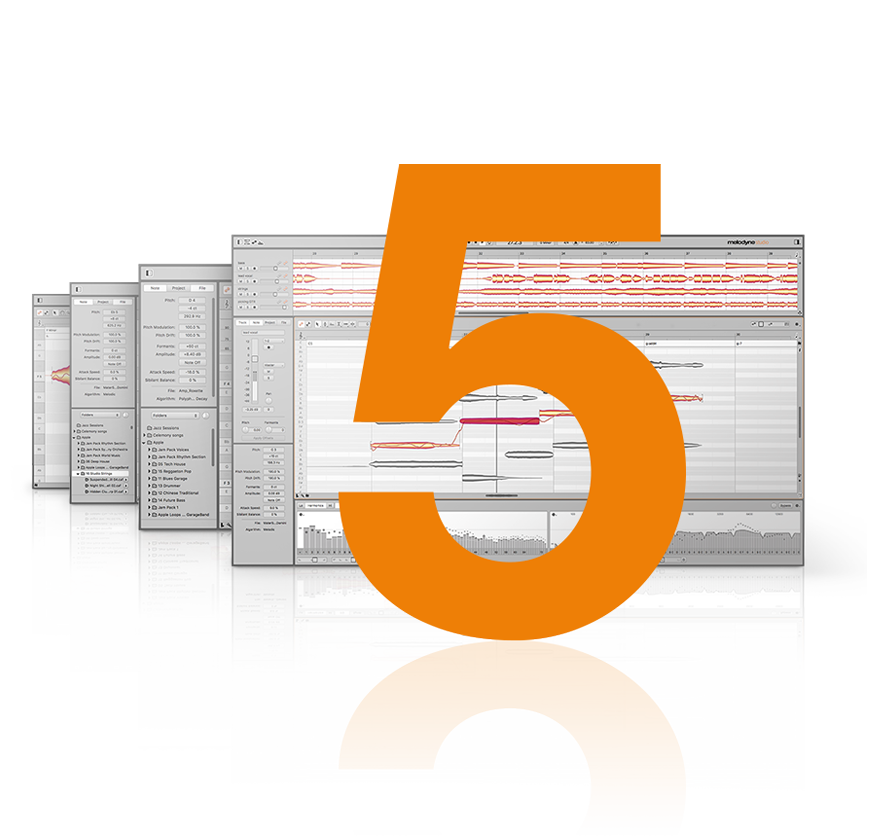
Melodyne grants you unrivaled access to all the musical details in your recordings and samples — note by note. This is made possible by a sophisticated analysis that delves deeply into your recordings and recognises and understands the musical relationships within them: the individual notes and their characteristics, the scales, keys and chords, the timing, the tempo, the tone colour. And with Melodyne you can edit all these things intuitively. With vocals, but every type of instrument as well — including polyphonic ones, such as the piano and guitar.
The Melodyne 5 Studio edition is the most advanced version, offering full polyphonic editing, DNA (Direct Note Access) for polyphonic instruments, the Sound Editor for tone colour manipulation, and all the tools needed for professional vocal tuning, timing correction, and creative sound design.
New in Version 5.3 Studio
The update to Version 5.3 contains improvements and bug fixes, which is why we recommend it to all users. Moreover, Melodyne 5.3 is required for ARA integration into Pro Tools 2022.9.
New Features & Improvements
- Surround Support — In both ARA and Transfer modes, Melodyne can now also be used for editing tracks in standard surround formats
- ARA in Pro Tools — Melodyne 5.3 comes with all technical prerequisites for ARA integration into Pro Tools from Version 2022.9 upwards, enabling a significantly improved workflow
- Improved Preferences — When Melodyne is employed for the first time as a plug-in, it loads the set of keyboard shortcuts corresponding to the DAW you are using
- Bug Fixes — Including fixes for recording in standalone mode, ARA event handling in Cubase, Pro Tools playback cursor positioning, M1 compatibility in Ableton Live, and more
✅ Why Choose Melodyne 5 Studio?
- ✅ Polyphonic editing (DNA) — edit individual notes within chords on piano, guitar, and more
- ✅ Professional pitch correction — natural-sounding or creative tuning for vocals and instruments
- ✅ Timing & tempo editing — move, stretch, and quantize individual notes
- ✅ Sound Editor — manipulate tone colour and formants
- ✅ ARA integration — seamless workflow with supporting DAWs including Pro Tools 2022.9+
- ✅ VST3 & AU formats — PC & Mac, Monterey and M1 compatible
Professional Pitch Correction at Your Fingertips
The industry standard for vocal tuning, timing correction, and polyphonic sound design — now with version 5.3 updates and ARA integration.
Add Melodyne 5 Studio to Cart — $35
Instant digital download • VST3/AU • PC & Mac • Monterey & M1 compatible
Key Features
- DNA Direct Note Access — the only technology that lets you edit individual notes within polyphonic audio recordings
- Scale & Key Detection — automatic recognition of scales, keys, and chords in your recordings
- Timing Tools — quantize, move, and stretch individual notes to tighten grooves or create new rhythmic patterns
- Pitch Correction — transparent, natural-sounding tuning plus creative extreme effects
- Sound Editor — adjust formants, vowel sounds, and tone colour for unique vocal and instrument textures
- ARA Support — deep integration with compatible DAWs for a non-destructive, real-time workflow
- Surround Compatibility — works with standard surround formats in both ARA and Transfer modes
Compatibility
Windows: VST3 Plugin — works in FL Studio, Cubase, Studio One, Reaper, and other VST3-compatible DAWs
Mac: AU & VST3 — works in Logic Pro, FL Studio, and other major DAWs — Monterey and M1 compatible
Pro Tools: ARA integration from Pro Tools 2022.9 onwards
Looking for more vocal processing tools? Browse our full VST plugins collection for additional effects. For synth-based sound design, check out our VST instruments.
â“ Frequently Asked Questions
🔹 What is the difference between Melodyne 5 Studio and smaller editions?
🔹 Does this version work on Apple Silicon Macs?
🔹 What is ARA and why does it matter?
🔹 Can I edit polyphonic audio like piano chords?
🔹 Is this the full version or a subscription?
Note: This is a digital VST plugin delivered as an instant download. No physical items are shipped. Online activation required. Windows version comes as VST3 plugin. Mac version works in AU and VST3 formats. M1 compatible.