

Clark Audio – Layers Pro
Clark Audio Layers Pro VST Plugin features triple-layer sound design with 250+ sources, 300+ presets, drag-and-drop modulation, and 35 effects. Create rich, textured instruments easily.
Original price was: $79.00.$39.00Current price is: $39.00.
Description
Clark Audio Layers Pro: Layered Sound Design Instrument with Extensive Library and Effects
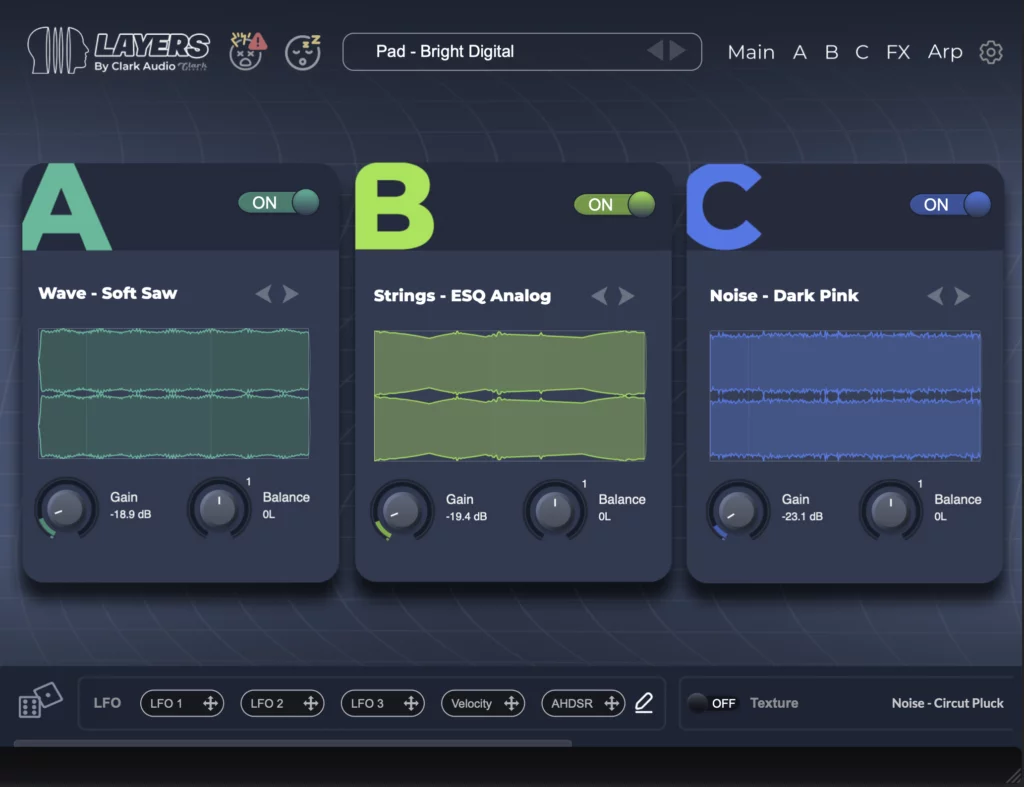
Creating rich, textured sounds often requires layering multiple sound sources and applying complex processing, but managing these layers across different plugins can be workflow-intensive and technically challenging. The Clark Audio Layers Pro VST Plugin addresses this by providing a complete layered sound design environment where you can combine up to three sound sources with comprehensive effects and modulation in a single intuitive interface. This integrated approach makes sophisticated sound design accessible while maintaining the depth needed for professional results.
With over 250 meticulously recorded sound sources and 300+ factory presets, Layers Pro offers extensive starting points for exploration. The drag-and-drop modulation system, 35 included effects, and randomization features encourage creative experimentation while the organized interface keeps complex sound design manageable. Whether you’re creating evolving pads, expressive leads, atmospheric textures, or unique hybrid sounds, Layers Pro provides the tools and content to bring your sonic ideas to life.
🎹 What Makes Layers Pro Special
Triple-Layer Sound Design Architecture
At the core of Layers Pro is its three-layer architecture, allowing you to combine different sound sources into cohesive hybrid instruments. Each layer can load any of the 250+ included sound sources or your own imported audio. Layers operate independently with their own volume, panning, filtering, and modulation assignments, then blend together at the master output. This architecture enables sophisticated sound design that would normally require multiple plugin instances and complex routing.
The layering approach supports various creative strategies. You might layer similar sounds to create richer versions (three different string sources for a lush string ensemble), contrasting sounds for hybrid textures (piano with synth pad and noise texture), or complementary sounds for complex evolutions (evolving pad with rhythmic element and atmospheric layer). The individual layer controls allow you to balance these elements precisely while maintaining their distinct characters.
Extensive Sound Library and Preset System
Layers Pro includes over 250 meticulously recorded sound sources covering acoustic instruments, synthetic textures, atmospheric elements, percussive sounds, and experimental recordings. These sources are organized categorically for easy browsing, with metadata that helps you find appropriate sounds quickly. The recording quality is professional throughout, ensuring that even raw sources sound polished and usable.
The 300+ factory presets demonstrate the plugin’s capabilities while providing immediate musical value. Presets cover categories like pads, leads, basses, textures, rhythms, and evolving sounds, with many designed for specific genres or musical applications. Each preset serves as both a ready-to-use sound and an educational example—by studying preset constructions, you can learn effective layering and processing techniques that you can then apply to your own creations.
Ready to Explore Layered Sound Design?
Add Clark Audio Layers Pro to your instrument collection and access triple-layer architecture with extensive sound library and effects
Intuitive Drag-and-Drop Modulation System
Layers Pro simplifies complex modulation through its drag-and-drop interface. Instead of programming a modulation matrix with source/destination assignments, you simply drag modulation sources (LFOs, envelopes, MIDI controllers) onto parameters you want to modulate. The visual feedback makes understanding modulation routing immediate, while depth controls allow precise adjustment of modulation amount.
Available modulation sources include multiple LFOs with various waveforms (including random and sample-and-hold), envelope generators with customizable shapes, MIDI continuous controllers, velocity, aftertouch, and key tracking. This comprehensive modulation capability enables creating evolving, expressive sounds that respond dynamically to performance input. The intuitive interface makes advanced modulation accessible even to producers new to sound design.
Comprehensive Effects Processing
The plugin includes 35 high-quality effects organized into categories that cover all essential processing needs. Delay effects include Multiband Delay, Ping Pong Delay, Reverse Delay, Slapback Delay, and Twist Delay for creating space and movement. Reverb effects range from simple room simulations to lush plate reverbs and infinite atmospheres.
Modulation effects include Auto-Panner, Chorus, Flanger, Phaser, Vibrato, and specialized effects like Grains and Pitch Reflections. Distortion and saturation options cover everything from subtle warmth (Vintage Saturator) to aggressive destruction (Shred Distortion). Utility tools like Detuner, Looper, Mid-Side processor, and Widener provide additional sound shaping capabilities. Each effect includes comprehensive controls while maintaining musical usability.
Common Questions About Layers Pro
Can I import my own audio samples into Layers Pro?
Yes, Layers Pro includes an audio import feature that allows you to bring your own samples into the instrument. Imported audio can be assigned to any of the three layers and processed with all the same tools as the factory sounds. This capability extends the plugin’s usefulness beyond the included library, allowing you to create custom instruments from your own recordings or other sample collections.
How does the randomization feature work?
The randomization feature can shuffle sound sources for each layer independently, creating unexpected combinations that can spark creativity. It can also generate unique arpeggiator sequences and modulate parameters randomly. This feature is particularly valuable when you’re stuck creatively or want to discover new sound possibilities you might not have considered through deliberate programming.
What are the system requirements?
Layers Pro requires Windows 10/11 (64-bit) or macOS 10.14 to 13+ (64-bit). It supports VST, VST3, AU, and AAX plugin formats. The plugin uses serial number activation (no third-party software required). The complete installation including the 5GB sample library requires adequate storage space, with SSD storage recommended for optimal loading performance.
How does Layers Pro compare to traditional synthesizers?
Layers Pro focuses on sample-based sound design with layering capabilities rather than traditional oscillator-based synthesis. While it includes some synthesis-like controls (filters, modulation, effects), its strength lies in combining and processing recorded sounds. This makes it particularly effective for creating organic, textured, and evolving sounds that might be difficult to achieve with purely synthetic approaches, while still offering the programming flexibility of a synthesizer.
Creative Randomization and Inspiration Tools
The randomization features in Layers Pro serve as both creative tools and educational resources. When you randomize sound sources, you encounter combinations you might not have chosen deliberately, potentially leading to unique discoveries. The arpeggiator randomization can create complex rhythmic patterns that serve as starting points for further development. These features are particularly valuable for breaking creative blocks or exploring outside your usual sound design habits.
Randomization can be applied selectively—you might randomize just one layer while keeping others constant, or randomize effects parameters while maintaining your sound source choices. This controlled randomization allows you to guide the discovery process rather than relying entirely on chance, maintaining some direction while still benefiting from unexpected suggestions.
Workflow Integration and Professional Applications
Layers Pro integrates smoothly into modern production workflows. The organized interface with categorized browsing makes finding sounds efficient, while the drag-and-drop modulation keeps sound design intuitive. The plugin includes comprehensive MIDI implementation for performance control and DAW automation, making it suitable for both studio production and live performance contexts.
Professional applications span music production, sound design, and media composition. Music producers use Layers Pro for creating distinctive sounds that stand out in mixes. Sound designers appreciate the layering capabilities for creating complex textures for film, games, and other media. The plugin’s versatility ensures it finds use across different creative contexts, from straightforward musical applications to experimental sound design.
Start Creating Unique Sounds Today
Join producers and sound designers who rely on Layers Pro for its triple-layer architecture, extensive library, and intuitive sound design workflow
Educational Value for Sound Design
Beyond practical use, Layers Pro serves as an excellent educational tool for understanding sound design principles. The visual modulation interface makes abstract concepts concrete—you can see how LFOs affect parameters, understand envelope shapes, and grasp modulation routing. The layer architecture teaches about frequency stacking, timbral blending, and arrangement of sound elements.
Studying the factory presets provides insight into professional sound design techniques. By examining how different presets are constructed—which sounds are layered, how they’re processed, what modulation is applied—you can develop your own sound design vocabulary. This learning-by-example approach accelerates skill development in a way that manual reading or theoretical study cannot match.
Additional Resources and Community
To get the most from Layers Pro, explore the tutorials and examples shared by the Clark Audio community. Many users create and share custom presets, demonstrating creative applications of the plugin’s capabilities. The intuitive nature of the interface means you can start achieving satisfying results quickly, while the depth available ensures continued learning and discovery over extended use.
If you’re building a comprehensive virtual instrument collection, Layers Pro pairs well with other specialized tools. For more traditional synthesis approaches, check out our selection of synthesizer plugins, or explore dedicated effects processors for further sound shaping beyond what’s included in Layers Pro’s comprehensive effects section.
Whether you’re seeking an instrument for creating rich, layered sounds, wanting to explore sample-based sound design with professional tools, or looking for creative inspiration through randomization and preset exploration, Clark Audio Layers Pro offers exceptional value and capability. Its combination of extensive content, intuitive workflow, and professional sound quality makes it more than just another virtual instrument—it’s a complete sound design environment that can significantly expand your creative possibilities.


Reviews
There are no reviews yet.