

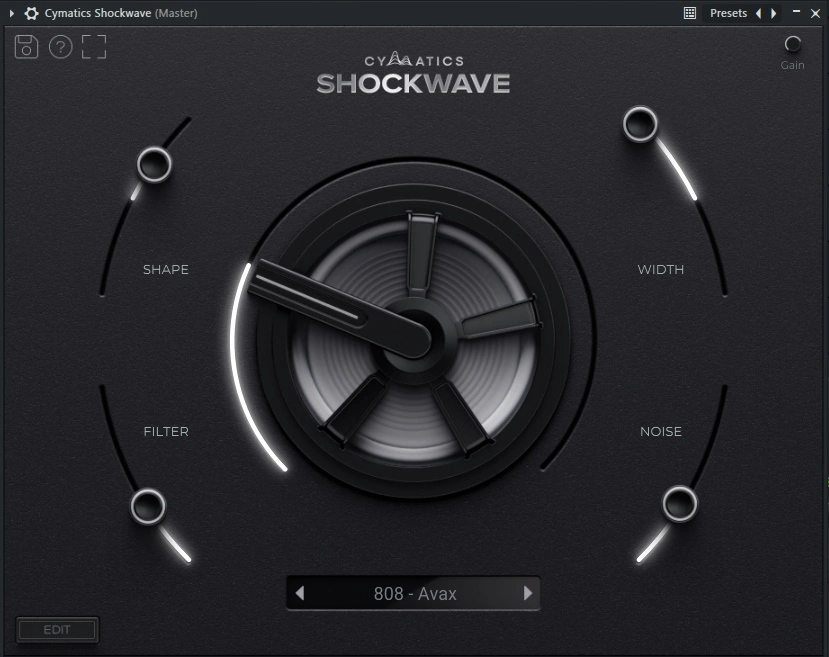
Cymatics Shockwave Bass Engine
Cymatics Shockwave Bass Engine VST plugin delivers powerful bass sounds with width, shape, filter, noise, and hype modules for Windows and macOS.
Original price was: $75.00.$40.00Current price is: $40.00.
Description
Cymatics Shockwave Bass Engine VST Plugin: Module‑Based Bass Design
Creating a bass sound that cuts through the mix and carries the right weight can be a time‑consuming process of layering samples, tweaking EQ, and applying saturation. The Cymatics Shockwave Bass Engine VST Plugin streamlines that workflow by providing a dedicated bass‑design environment built around five customizable modules: Width, Shape, Filter, Noise, and Hype. Each module focuses on a specific aspect of bass shaping, allowing you to dial in everything from stereo width and envelope contour to tonal character and harmonic saturation within a single interface.
Shockwave is more than just a collection of 808 samples; it’s a full‑fledged bass synthesizer that generates sounds dynamically based on your settings. The plugin includes an extensive library of preset starting points, but the real power lies in the module controls, which let you transform any preset into a unique sound tailored to your track. Whether you produce hip‑hop, trap, electronic, or pop, Shockwave gives you the tools to craft low‑end that hits hard and sits perfectly in your mix.
How Shockwave Simplifies Bass Sound Design
Traditional bass design often involves loading multiple plugins—a synth for tone, an EQ for shaping, a stereo imager for width, a saturator for grit—and coordinating them all. Shockwave consolidates these tasks into a unified workspace. The five modules are arranged logically, so you can adjust the stereo field, envelope, filter, noise layer, and saturation in real time without jumping between windows. This integrated approach speeds up your workflow and encourages experimentation, as you can hear the cumulative effect of each adjustment instantly.
The plugin’s interface is designed for clarity: each module has a dedicated section with knobs and visual feedback, and there’s a central macro knob (Hype) that blends multiple saturation stages for quick tonal variation. Even if you’re new to sound design, the labeled controls and intuitive layout make it easy to understand what each parameter does.
🎹 Five Dedicated Modules – Width, Shape, Filter, Noise, and Hype modules provide targeted control over stereo image, envelope, tone, texture, and saturation.
🎵 Extensive Preset Library – Hundreds of 808, sub‑bass, distorted bass, and hybrid bass presets ready to load and customize.
🎛️ Width Control – Adjust stereo spread and mono compatibility, ensuring your bass remains punchy on all playback systems.
✨ Shape Envelope – Fine‑tune volume, pitch, and filter envelopes for precise attack, decay, and sustain characteristics.
🎨 Filter Section – Sculpt tone with low‑pass, high‑pass, or band‑pass filtering, plus resonance for emphasized frequencies.
⚡ Noise Generator – Add customizable noise layers for texture, grit, or percussive accents without loading external samples.
🔄 Hype Macro – A central knob that blends multiple saturation stages, from subtle warmth to aggressive distortion and harmonic color.
📈 Low CPU Footprint – Efficient engine ensures smooth performance even with complex modulation and multiple instances.
Module‑By‑Module Breakdown
Width Module: This controls the stereo image of your bass. You can narrow the sound for a focused, mono‑compatible low end or widen it for a larger‑than‑life feel. The module includes a stereo‑width knob and a mono‑maker switch to ensure your sub frequencies remain centered.
Shape Module: Here you adjust the volume envelope (attack, decay, sustain, release) as well as pitch and filter envelopes. This is where you define the punchiness and movement of the bass—short attacks for tight kicks, longer decays for sustained sub‑bass, pitch envelopes for “dropping” 808s, etc.
Filter Module: A multi‑mode filter (low‑pass, high‑pass, band‑pass) with cutoff and resonance controls. Use it to roll off harsh highs, carve out space for other elements, or create resonant sweeps that add animation to your bassline.
Noise Module: Adds a layer of synthetic noise that can be filtered, enveloped, and blended with the core bass sound. Noise is excellent for adding transient punch, air, or gritty texture, especially in distorted bass genres.
Hype Module: The central macro knob that applies a combination of saturation, distortion, and harmonic excitation. Turning up Hype adds progressively more aggression and color, transforming a clean sub‑bass into a gritty, in‑your‑face tone.
Preset Library and Customization Workflow
Shockwave comes with a large library of presets organized by style—808s, sub‑basses, distorted basses, melodic basses, and more. Each preset is a starting point that you can modify using the five modules. Because the modules are independent, you can, for example, take a clean 808 preset, add width, shorten the decay, boost the noise layer, and crank the Hype knob to create a completely new sound in seconds.
The plugin also supports user presets, so you can save your custom creations and recall them instantly in future projects. This makes Shockwave not only a sound‑design tool but also a personal bass library that grows with your production style.
Add Shockwave Bass Engine to Your Low‑End Toolkit
Get module‑based bass design with width, shape, filter, noise, and hype controls—plus hundreds of presets—in a VST/AU plugin for Windows and macOS.
Compatibility & System Requirements
Cymatics Shockwave Bass Engine is available as VST and AU plugin formats, ensuring compatibility with virtually all modern DAWs on Windows and macOS. The plugin is optimized for efficient CPU usage, allowing multiple instances in a project. Detailed requirements:
- Windows: Windows 7 or later (64‑bit). Compatible with Ableton Live, FL Studio, Cubase, Studio One, Reaper, Bitwig, and other VST hosts.
- macOS: macOS 10.9 or later (Intel & Apple Silicon). Compatible with Logic Pro, Ableton Live, Cubase, Studio One, and other AU/VST hosts.
The plugin supports sample rates up to 192 kHz and includes oversampling options for cleaner high‑frequency content. The interface is fully resizable and retina‑ready.
Frequently Asked Questions
Expand Your Bass Production Toolkit
If you’re looking to build a comprehensive bass‑processing setup, consider pairing Shockwave with other dedicated bass tools. Browse our VST instruments category for more bass synths and samplers. For effects that can further shape your low end, check out our VST effects collection.
To learn more about Shockwave’s features and hear audio demos, visit the Cymatics official product page. For tips on mixing modern bass, MusicRadar’s bass‑mixing guide offers practical advice.
Craft Powerful, Custom Bass Sounds with Shockwave
With its five dedicated modules, extensive preset library, and intuitive interface, the Cymatics Shockwave Bass Engine gives you a focused environment for designing low‑end that hits hard and fits perfectly in your mix. Whether you need tight 808s, gritty distorted basses, or evolving sub‑textures, this plugin delivers the tools and inspiration to elevate your bass production.
Note: Cymatics Shockwave Bass Engine is a digital product. After purchase, you’ll receive instant download instructions. Compatible with Windows 7+ (64‑bit) and macOS 10.9+ (Intel & Apple Silicon).

CrazyBass –
So good bass sounds and modulation features.