

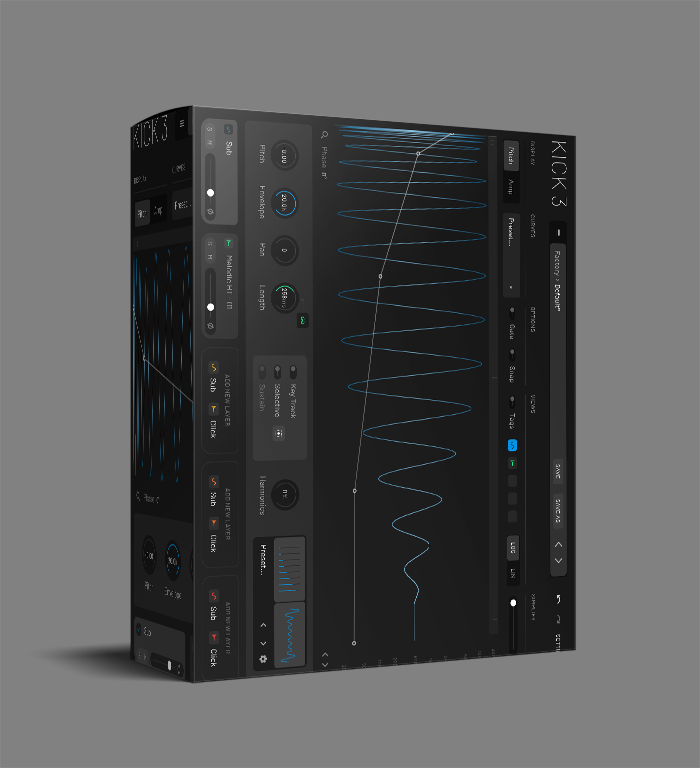
KICK 3 Drum VST Plugin
Kick 3 Drum VST Plugin creates perfect kick drums with three oscillators, built-in effects, and 200+ presets. Professional tool for EDM, techno, hip-hop, and house producers.
Original price was: $82.00.$40.00Current price is: $40.00.
Description
KICK 3 Drum VST Plugin: Craft Perfect Kick Drums with Precision Control
Finding the right kick drum can make or break a track. Whether you’re working on a pounding techno beat, a deep house groove, or a tight hip-hop rhythm, the kick drum provides the foundation that everything else builds upon. The KICK 3 Drum VST Plugin from Sonic Academy gives you complete creative control over this crucial element, letting you design custom kicks that fit perfectly in your mix without searching through endless sample libraries.
This specialized kick synthesizer goes beyond simple sample playback, offering three oscillators, comprehensive shaping tools, and built-in effects that help you create everything from subtle acoustic-style kicks to aggressive electronic thumps. With over 200 professionally designed presets and an intuitive interface, KICK 3 works equally well for beginners who want instant results and experienced producers who demand deep sound design capabilities.
🎵 What Makes KICK 3 Drum VST Plugin Special
Detailed Sound Design Capabilities
At the heart of KICK 3 are three carefully designed oscillators that give you precise control over every aspect of your kick drum’s character. The sine oscillator provides the fundamental low-end thump, while the noise oscillator adds attack and texture. The tone oscillator brings mid-range definition and body, allowing you to create kicks that cut through even the busiest mixes.
Each oscillator features independent pitch envelopes, giving you control over how the sound evolves from the initial attack through to the sustain and release phases. This lets you create everything from short, sharp kicks ideal for fast-paced genres to long, boomy kicks that work perfectly in slower, more atmospheric tracks.
Built-In Processing for Studio-Quality Results
KICK 3 includes a comprehensive effects section that lets you polish your sounds without leaving the plugin. The distortion module can add anything from subtle warmth to aggressive harmonic saturation, perfect for giving your kicks extra presence in the mix. The EQ section provides surgical control over frequency balance, while the compressor helps you control dynamics and add punch.
Perhaps most creatively useful is the LFO modulation system, which can add movement and evolution to your kicks. This is particularly effective for creating interesting textures in breakdowns or building tension in transitions.
Ready to Transform Your Kick Drums?
Add the KICK 3 Drum VST Plugin to your production toolkit and create perfect kicks for any genre
Preset Library for Instant Inspiration
While KICK 3 offers deep sound design capabilities, you don’t always need to start from scratch. The plugin includes over 200 professionally designed presets organized by genre and style. Whether you’re working on dubstep, house, techno, hip-hop, or any other electronic genre, you’ll find multiple starting points that get you close to the sound you’re imagining.
Each preset serves as both a finished sound and an educational tool. By examining how the professionals have configured the oscillators, envelopes, and effects, you’ll quickly learn how to create specific types of kicks and develop your own signature sounds.
Workflow Integration and Compatibility
KICK 3 is designed to fit seamlessly into your existing production workflow. The plugin supports VST3, AU, and AAX formats, making it compatible with virtually every major DAW including Ableton Live, FL Studio, Logic Pro, Cubase, Pro Tools, and more. Despite its powerful capabilities, it remains lightweight on system resources, ensuring smooth performance even in projects with dozens of tracks and effects.
The interface strikes a perfect balance between depth and accessibility. All the essential controls are immediately visible and logically organized, while more advanced parameters are available without cluttering the workspace. The drag-and-drop functionality for preset browsing and parameter adjustment makes experimentation fast and intuitive.
Common Questions About KICK 3 Drum VST
What makes KICK 3 different from using kick drum samples?
While samples offer convenience, they limit creative control. KICK 3 generates kicks synthetically, giving you complete control over every aspect of the sound. You can shape the exact pitch envelope, adjust the noise characteristics, modify the harmonic content, and add movement that would be impossible with static samples. This results in kicks that fit perfectly in your mix and can be tailored to specific musical contexts.
Can beginners use KICK 3 effectively?
Absolutely. The extensive preset library means you can achieve professional results immediately, even without deep sound design knowledge. As you become more comfortable, you can start modifying presets and eventually create your own sounds from scratch. The interface is designed to be intuitive, with clear visual feedback that helps you understand how different parameters affect the sound.
How does KICK 3 handle different musical genres?
The plugin includes genre-specific presets covering everything from deep house and techno to dubstep and hip-hop. The sound design capabilities allow you to create anything from subtle acoustic-style kicks to aggressive electronic thumps. The three-oscillator architecture and comprehensive effects make it versatile enough for any genre that relies on strong, well-defined kick drums.
What are the system requirements for KICK 3?
KICK 3 runs on both Windows (7 or higher) and macOS (10.9 or higher) systems. It requires a DAW that supports VST3, AU, or AAX plugin formats. The plugin is relatively lightweight and should run smoothly on most modern computers, even in large projects with many other instruments and effects.
Professional Applications and Techniques
Professional producers use KICK 3 in various creative ways. Many layer it with acoustic kick samples to create hybrid sounds that combine the punch and consistency of synthesis with the natural character of recorded drums. Others use it as their primary kick source, creating entirely synthetic drum foundations that give their tracks a distinctive, modern sound.
Advanced techniques include using the LFO modulation to create evolving kicks that change throughout a section, or stacking multiple instances with slightly different settings to create huge, layered kick sounds. The distortion and compression modules allow you to push sounds into more aggressive territory while maintaining control over the final result.
For those interested in sound design, KICK 3 serves as an excellent educational tool. By studying how different envelope shapes affect perception, how noise content contributes to attack, and how harmonic distortion adds presence, you’ll develop skills that transfer to other areas of synthesis and mixing.
Create Your Perfect Kick Drums Today
Join thousands of producers who rely on KICK 3 for their kick drum needs. With its combination of deep sound design capabilities and immediate usability, it’s the perfect tool for any producer looking to improve their low-end.
Additional Resources and Learning
To get the most out of KICK 3, consider exploring additional learning resources. The Sonic Academy website offers tutorials and courses that can help you master the plugin. Many producers also share their KICK 3 techniques on platforms like YouTube, providing additional inspiration and workflow tips.
If you’re looking to expand your drum production capabilities further, consider pairing KICK 3 with other specialized tools. For more general drum synthesis, check out our selection of drum VST plugins that cover everything from snares and hi-hats to complete drum machines.
Whether you’re a bedroom producer working on your first tracks or a professional creating music for major releases, KICK 3 Drum VST Plugin provides the tools you need to create perfect kick drums every time. Its combination of intuitive design, professional sound quality, and workflow efficiency makes it an invaluable addition to any producer’s toolkit.
Reviews
There are no reviews yet.