

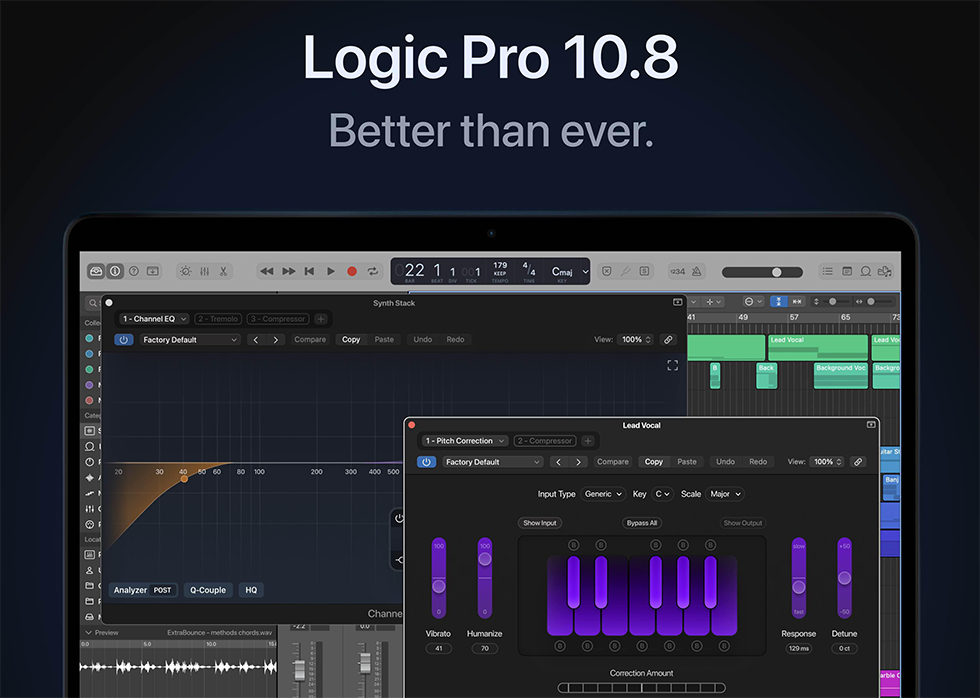
Logic Pro 10.8.1
Logic Pro 10.8.1 delivers professional music production with enhanced stability, comprehensive instruments, and effects for macOS creators.
Original price was: $249.99.$45.00Current price is: $45.00.
Description
Logic Pro 10.8.1: Professional Music Production Studio for macOS
For musicians, producers, and audio engineers working on macOS, Logic Pro has long been the go‑to digital audio workstation (DAW) for its comprehensive feature set, intuitive workflow, and professional‑quality built‑in instruments and effects. Logic Pro 10.8.1 represents the latest stable update in this lineage, delivering enhanced stability, bug fixes, and refinements that ensure a smooth, reliable production experience. Whether you’re recording live instruments, programming electronic beats, scoring films, or mixing full albums, Logic Pro 10.8.1 provides a complete creative environment that scales from bedroom projects to professional studio work.
This update focuses primarily on reliability and performance improvements, addressing issues that could cause crashes, hangs, or unexpected behavior in specific scenarios. While not introducing major new features, 10.8.1 ensures that the powerful tools already present in Logic Pro—such as Live Loops, Smart Tempo, the revamped Sampler, and the extensive collection of virtual instruments and effects—work flawlessly. For users who depend on Logic Pro for daily production, this update represents an essential maintenance release that keeps your studio running smoothly.
What Logic Pro 10.8.1 Fixes and Improves
Apple’s focus with version 10.8.1 is squarely on stability and reliability. Here are the key issues addressed in this update:
- MIDI Timeout Errors Resolved: Logic Pro no longer displays a MIDI Timeout error when loading certain projects, ensuring smoother project opening and MIDI device integration.
- Plugin‑Handling Improvements: Fixed an issue where Logic Pro could hang when loading a project that contains plugins not installed on the computer, preventing frustrating freezes.
- Sample Alchemy Stability: Corrected a problem where Logic could quit unexpectedly when multiple MIDI regions are dragged into Sample Alchemy, making this powerful sampler more robust.
- Project‑Switching Reliability: Resolved an issue in which switching between open projects might cause Logic Pro to quit unexpectedly if one of them is using Flex Time.
- Live Loops Editor Fix: Choosing Edit → Edit Transients for an audio file in the Live Loops cell editor no longer causes Logic Pro to quit unexpectedly.
- Audio Import Improvements: Fixed an issue where Logic could hang when importing audio tracks from a project with a different sample rate.
These fixes make Logic Pro 10.8.1 a recommended update for all users, especially those working on complex projects or using third‑party plugins extensively.
🎛️ Professional DAW Environment – Complete recording, editing, mixing, and mastering workspace for macOS.
🎹 Extensive Instrument Library – Sampler, Alchemy, Vintage keyboards, drum machines, orchestral instruments, and more.
✨ Live Loops & Smart Tempo – Non‑linear music creation and automatic tempo matching for flexible workflows.
🎵 Professional Effects Suite – Channel EQ, compressor, reverb, delay, modulation, and mastering processors.
⚡ Enhanced Stability – Critical bug fixes for MIDI, plugin loading, Sample Alchemy, and project switching.
🔄 Flex Time & Pitch – Advanced audio editing with time‑stretching and pitch‑correction tools.
📈 Cinematic Scoring Tools – Score editor, video playback, and surround sound support for film and TV work.
🎨 Modern Interface – Fully customizable, retina‑ready UI with dark mode and streamlined workflow enhancements.
Core Features of Logic Pro for Modern Production
Beyond the stability improvements in 10.8.1, Logic Pro offers a wealth of features that make it a complete production solution:
- Live Loops: A grid‑based, non‑linear environment for triggering loops, samples, and patterns in real time, ideal for electronic music and improvisation.
- Smart Tempo: Automatically detects and matches the tempo of audio recordings, allowing you to mix loops and recordings of different tempos seamlessly.
- Sampler & Quick Sampler: Powerful sampling instruments that let you map, edit, and manipulate audio across the keyboard with advanced modulation and effects.
- Alchemy Synthesizer: A deep, versatile synth with additive, spectral, granular, and virtual analog synthesis engines, plus an extensive preset library.
- Drum Machine Designer: A customizable drum instrument that lets you build kits from individual samples and apply per‑pad processing.
- Professional Mixing Console: Full mixing desk emulation with channel strips, bus routing, automation, and comprehensive plugin support (AU format).
- Audio Editing & Flex Tools: Precise audio editing with time‑stretching (Flex Time) and pitch‑correction (Flex Pitch) that rivals dedicated tools.
- Score Editor: Create, edit, and print musical notation, making Logic Pro suitable for composers and arrangers.
These features are complemented by hundreds of high‑quality instrument patches, thousands of loops and samples, and professional effects that rival third‑party plugins.
Who Should Use Logic Pro 10.8.1
Logic Pro is designed for a wide range of users, from hobbyists to professional producers and composers. It’s particularly well‑suited for:
- Songwriters & Composers: The intuitive workflow, extensive instrument library, and notation tools streamline the creation of songs and arrangements.
- Electronic Music Producers: Live Loops, step sequencers, and deep synthesis capabilities cater to genres like EDM, hip‑hop, and pop.
- Audio Engineers & Mixers: The mixing console, professional effects, and support for third‑party plugins provide a complete mixing and mastering environment.
- Film & Media Composers: Video playback, surround sound, and scoring tools make Logic Pro a viable option for soundtrack and sound‑design work.
- Podcasters & Content Creators: Multitrack editing, noise removal, and voice‑processing tools are useful for audio‑for‑video and spoken‑word projects.
Because Logic Pro is a one‑time purchase (not a subscription) and receives regular free updates, it offers excellent long‑term value for macOS‑based creators.
Add Logic Pro 10.8.1 to Your Creative Toolkit
Get a professional DAW with comprehensive instruments, effects, stability improvements, and macOS integration—all in one package.
System Requirements & Compatibility
Logic Pro 10.8.1 requires macOS and is optimized for Apple Silicon (M‑series) processors while maintaining support for Intel‑based Macs. Here are the detailed requirements:
- Operating System: macOS 11 (Big Sur) or later. macOS 12 (Monterey) and macOS 13 (Ventura) are fully supported.
- Processor: Apple Silicon (M1, M2, M3) or Intel Core i5/i7/i9. Performance is significantly enhanced on Apple Silicon.
- Memory: 8GB RAM minimum, 16GB or more recommended for large projects and sample libraries.
- Storage: 6GB of free disk space for installation, plus additional space for projects and sound libraries (the full Sound Library can exceed 70GB).
- Display: 1280×768 resolution or higher; retina displays are fully supported.
- Audio Interface: Any Core Audio‑compatible interface for recording and playback.
Logic Pro supports third‑party Audio Units (AU) plugins, VST is not natively supported (though some wrapper solutions exist). The software receives free updates from Apple, which may introduce new features and additional system requirements over time.
Frequently Asked Questions
Complement Your Production Setup
If you’re building a complete music production studio, consider pairing Logic Pro with additional tools. Browse our VST instruments category for more synthesizers and sample libraries that work as AU plugins in Logic. For audio interfaces and hardware controllers that integrate seamlessly with Logic, check out our audio interface collection.
To learn more about Logic Pro’s features and official system requirements, visit the Apple Logic Pro website. For detailed update notes on version 10.8.1, refer to Apple’s support document.
Professional Music Production on macOS with Logic Pro
With its comprehensive feature set, professional‑quality instruments and effects, and the stability improvements of version 10.8.1, Logic Pro delivers a complete music production environment that supports every stage of creation—from initial idea to final master. Whether you’re a songwriter, producer, engineer, or composer, this DAW provides the tools and reliability you need to bring your musical vision to life.
Note: Logic Pro 10.8.1 is a digital product for macOS only. After purchase, you’ll receive instructions for downloading and activating the software through the Mac App Store. Requires an Apple ID and internet connection for download and activation. Compatible with macOS 11+ on Apple Silicon or Intel processors.

Reviews
There are no reviews yet.