

Plugins That Knock – KNOCK AU/VST3/AAX
Plugins That Knock – KNOCK Drum Shaper delivers six drum-processing modules for punch, saturation, sub weight, air, clipping, and output control.
Original price was: $119.00.$45.00Current price is: $45.00.
Description
Plugins That Knock – KNOCK Drum Shaper: 6‑Module Processing for Impactful Drums
When your drums lack punch, weight, or presence, reaching for multiple plugins to fix each issue can slow down your workflow. The Plugins That Knock – KNOCK Drum Shaper consolidates six essential drum‑processing modules into a single, intuitive interface, giving you everything you need to make drums cut through the mix with authority. Developed by platinum producer DECAP (creator of the acclaimed DRUMS THAT KNOCK series), KNOCK embodies the processing techniques he uses to craft the hard‑hitting drum sounds heard in countless hit records.
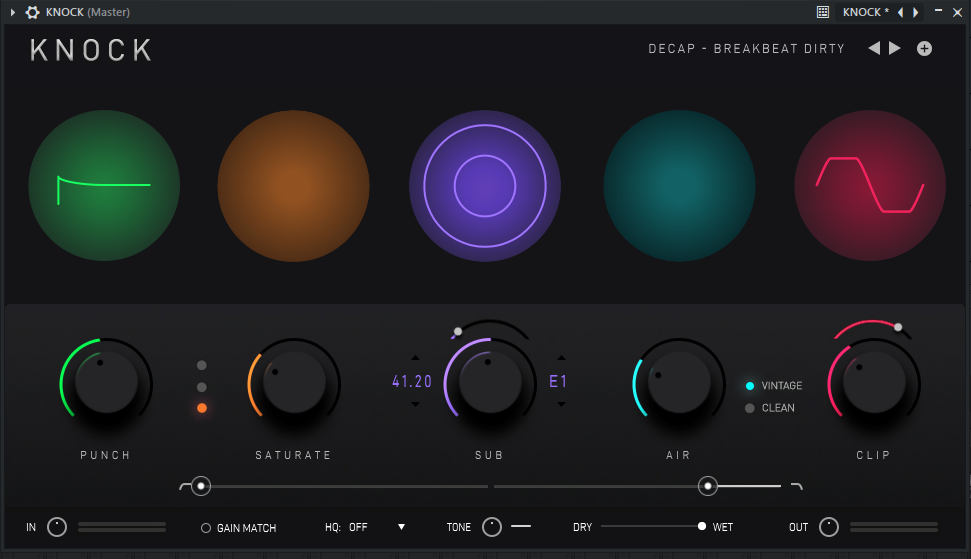
Rather than offering generic compression or EQ, KNOCK focuses on specific tasks: enhancing transients (Punch), adding harmonic saturation (Saturate), generating sub‑frequency weight (Sub), boosting air and clarity (Air), controlling peaks with clipping (Clip), and providing overall level control (Output). Each module is designed with musical, genre‑appropriate defaults, so even simple adjustments yield professional results. Whether you’re processing 808s, kicks, snares, or full drum loops, KNOCK delivers the impact you need without complexity.
How KNOCK’s Six Modules Transform Drum Sounds
KNOCK’s interface presents six dedicated processing sections in a logical left‑to‑right signal flow. Here’s what each module does and when to use it:
🥁 Punch – Transient shaper that enhances attack and snap, making drums feel more immediate and percussive.
✨ Saturate – Adds harmonic distortion with three modes (soft, medium, hard) for warmth, grit, or aggression.
🎵 Sub – Detects kick drums and generates a pitched sub‑frequency layer to reinforce low‑end weight.
🎛️ Air – High‑frequency enhancer with vintage and clean modes for adding brightness without harshness.
⚡ Clip – Adjustable hard/soft clipper that lets you push levels for analog‑style saturation without digital distortion.
📈 Output & Mix – Overall level control and dry/wet blend for parallel processing.
Practical Applications for Different Drum Elements
Kicks & 808s: Use the Sub module to add or reinforce sub‑bass content, especially useful when your kick sample lacks low‑end weight. The Punch control can sharpen the attack, while Saturate (soft mode) adds harmonic warmth. The Clip module can tame peaks and add gentle saturation reminiscent of pushing analog gear.
Snares & Claps: The Punch module is essential for adding snap and presence. Air (clean mode) can bring out the high‑frequency “crack” without introducing noise. Saturate (medium or hard) can give snares more aggression and body, especially in hip‑hop and trap productions.
Hi‑Hats & Percussion: Air (vintage mode) can add a smooth, analog‑style shimmer to hi‑hats. The Punch control can emphasize the transient of percussive hits, making them cut through busy mixes.
Drum Loops & Breaks: When processing full drum loops, use Punch to enhance overall transients, Saturate to glue the elements together with harmonic content, and Clip to control peaks and add character. The Sub module can be bypassed or used subtly to avoid overwhelming the low end.
Workflow Benefits and Preset Library
KNOCK is designed for speed and musicality. The controls are intentionally limited to the most impactful parameters, so you don’t get lost in technical tweaking. Each knob has a clear, audible effect, making it easy to dial in the desired sound quickly. The plugin includes factory presets crafted by DECAP for common scenarios (e.g., “808 Punch,” “Snare Snap,” “Lo‑Fi Break,” “Aggressive Kick”), giving you a starting point that you can then customize.
Because KNOCK is lightweight on CPU, you can insert it on multiple drum tracks without worrying about performance hits. This makes it practical to process each drum element individually—kick, snare, hats, etc.—with tailored settings, rather than applying the same processing to the entire drum bus.
Add KNOCK to Your Drum‑Processing Toolkit
Get six dedicated drum‑shaping modules, factory presets, and low CPU usage—all in a VST3/AU/AAX plugin for Windows and macOS.
Compatibility & System Requirements
Plugins That Knock – KNOCK is available as VST3, AU, and AAX plugin formats, ensuring compatibility with virtually all modern DAWs on Windows and macOS. The plugin is optimized for low CPU usage, allowing multiple instances in a project. Detailed requirements:
- Windows: Windows 8.1, 10, or 11 (64‑bit). Requires Intel Core i5/i7/i9/Xeon (Gen 5+) or AMD Quad Core. Compatible with Ableton Live, FL Studio, Cubase, Studio One, Reaper, Bitwig, Pro Tools, and other VST3/AAX hosts.
- macOS: macOS 11+ (Intel & Apple Silicon). Compatible with Logic Pro, Ableton Live, Cubase, Studio One, Pro Tools, and other AU/VST3/AAX hosts. Fully tested on macOS Sonoma and Apple M1/M2/M3 processors.
The plugin requires a minimum of 8GB RAM (16GB recommended) and about 500MB of free disk space for installation.
Frequently Asked Questions
Expand Your Drum‑Processing Collection
If you’re looking to build a comprehensive drum‑production toolkit, consider pairing KNOCK with other specialized drum processors. Browse our VST effects category for more compressors, EQs, and transient shapers. For drum samples and loops that can be enhanced with KNOCK, check out our sound loops & samples collection.
To learn more about KNOCK’s development and hear audio examples, visit the Plugins That Knock official website. For tips on processing drums in modern productions, MusicRadar’s drum‑mixing guide offers practical advice.
Give Your Drums the Impact They Deserve with KNOCK
With its six dedicated modules, intuitive controls, and low CPU footprint, Plugins That Knock – KNOCK provides a focused, effective solution for making drums punch through any mix. Whether you’re enhancing 808s, sharpening snares, or adding weight to kicks, this plugin delivers the professional results that DECAP’s signature sound is known for.
Add Plugins That Knock – KNOCK Drum Shaper to Cart – Only $45
Note: Plugins That Knock – KNOCK is a digital product. After purchase, you’ll receive instant download instructions and a license key for activation. The plugin requires an internet connection for initial activation. Compatible with Windows 8.1+ (64‑bit) and macOS 11+ (Intel & Apple Silicon).
Reviews
There are no reviews yet.