

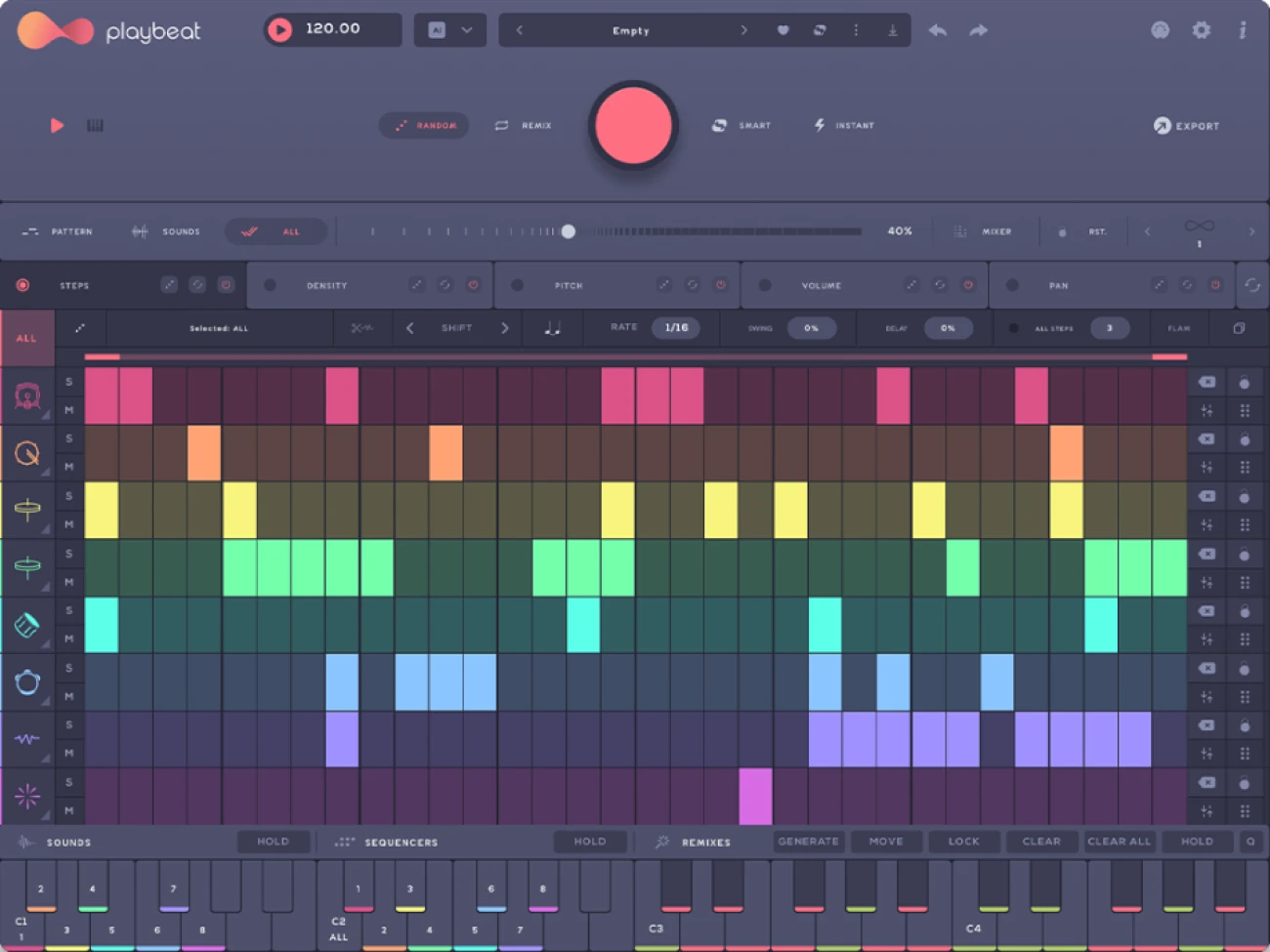
Audiomodern Playbeat 4 VST Plugin
Audiomodern Playbeat 4 VST Plugin uses AI-powered genre-based pattern generation for unique drum beats. Features eight sequencers, 1500+ kits, and real-time remixing capabilities.
Original price was: $69.00.$40.00Current price is: $40.00.
Description
Audiomodern Playbeat 4 VST Plugin: AI-Powered Drum Pattern Generation
Creating fresh, compelling drum patterns is one of the most challenging aspects of modern production. It’s easy to fall into repetitive rhythms or spend hours tweaking beats that never quite feel right. The Audiomodern Playbeat 4 VST Plugin addresses this challenge with an intelligent approach to rhythm generation, using AI-powered algorithms to create unique, genre-appropriate drum patterns that inspire rather than frustrate.
This innovative drum designer goes beyond traditional sequencers by understanding musical context and generating patterns that fit specific genres while maintaining enough variation to keep things interesting. With eight independent sequencers, a massive library of sounds and kits, and real-time remixing capabilities, Playbeat 4 provides a complete drum production environment that adapts to your creative needs.
🥁 What Makes Playbeat 4 VST Plugin Special
Intelligent Pattern Generation That Understands Genre
At the core of Playbeat 4 is an AI system that analyzes musical genre characteristics to generate appropriate drum patterns. When you select “techno,” the plugin understands the typical rhythmic structures, common drum sounds, and pattern variations associated with that genre. The same applies to hip-hop, house, drum and bass, or any of the other supported styles. This contextual awareness means you’re not just getting random patterns—you’re getting musically coherent suggestions that fit your project’s direction.
The generation process includes multiple layers of intelligence. The AI considers pattern complexity, fills and variations, sound selection, and even humanization elements. You can guide the process by adjusting parameters like complexity level, randomization amount, and pattern length, giving you control over the outcome while still benefiting from the AI’s creative suggestions.
Comprehensive Sequencing and Sound Design Environment
Playbeat 4 provides eight fully independent sequencers, each controlling a different drum element or sound. This goes beyond simple kick-snare-hat arrangements—you can sequence complex percussion layers, electronic sounds, atmospheric elements, or any other audio material. Each sequencer includes detailed controls for timing, velocity, probability, and micro-timing adjustments, allowing for nuanced rhythmic expression.
The integrated sample editor lets you modify sounds directly within the plugin. You can adjust pitch, apply filtering, set up choke groups for realistic drum behavior, and create custom velocity responses. This means you can design complete drum kits without ever leaving the Playbeat 4 environment, maintaining a streamlined workflow from sound design to pattern creation.
Ready to Revolutionize Your Drum Production?
Add Audiomodern Playbeat 4 VST Plugin to your setup and discover AI-powered drum pattern generation
Real-Time Remixing and Performance Features
One of Playbeat 4’s most powerful features is its real-time remixing capability. While a pattern plays, you can trigger variations, fills, and complete pattern changes using keyboard shortcuts or MIDI controllers. The SMART mode intelligently transitions between patterns, ensuring smooth changes that maintain musical coherence. The Infinity mode continuously generates new variations, perfect for live performances or extended improvisation sessions.
The multi-functional keyboard view transforms your computer keyboard into a performance instrument. You can trigger individual sounds, complete patterns, or specific variations, making Playbeat 4 feel more like an instrument than a sequencer. This performance-oriented approach encourages experimentation and can lead to unexpected creative discoveries.
Sound Library and Customization Options
Playbeat 4 includes an extensive factory library with over 1,500 kits, patterns, and individual sounds. These cover a wide range of genres and styles, from acoustic drum kits to electronic sound design elements. The library is organized with a sophisticated tagging system, making it easy to find sounds that match your current project’s needs.
Beyond the factory content, Playbeat 4 allows you to import your own samples and create custom kits. You can organize these into custom packs complete with artwork, descriptions, and tags. These packs can be shared between desktop and iPad versions of the plugin, facilitating collaboration and workflow consistency across different devices.
Common Questions About Playbeat 4 VST Plugin
How does the AI pattern generation actually work?
Playbeat 4’s AI analyzes thousands of drum patterns across different genres to understand what makes them work musically. When you select a genre, it uses this knowledge to generate patterns that follow the genre’s conventions while introducing enough variation to keep them fresh. You can adjust parameters like complexity and randomness to guide the generation toward your specific preferences.
Can I use Playbeat 4 with my own samples?
Absolutely. Playbeat 4 allows you to import any audio files and use them within the plugin. You can create custom kits from your sample library, apply the same AI generation and sequencing features to them, and even build complete custom packs that you can share with others or use across different projects.
What’s the difference between Playbeat 4 and traditional drum machines?
Traditional drum machines require you to program every step manually. Playbeat 4 combines programmed sequencing with AI generation, giving you both manual control and intelligent assistance. The real-time remixing features, extensive sound library, and custom pack creation also go beyond what most drum machines offer, making it more of a complete drum production environment.
Is Playbeat 4 suitable for live performance?
Yes, Playbeat 4 includes several features specifically designed for live use. The performance keyboard, real-time pattern changes, SMART transitions, and Infinity mode all make it well-suited for live sets. You can map controls to MIDI controllers and create dynamic, evolving drum performances that respond to audience energy and your creative impulses.
Workflow Integration and Export Options
Playbeat 4 integrates smoothly into professional production workflows. It’s available as a VST3, AU, AAX plugin for use within your DAW, and also as a standalone application for quick sketching or performance situations. The interface is fully customizable, allowing you to arrange windows and controls to match your preferred workflow.
When you’ve created patterns you want to use in your projects, Playbeat 4 offers multiple export options. You can export individual patterns as MIDI files to further edit them in your DAW’s piano roll. You can also export complete drum tracks as audio, either as stems for individual elements or as a mixed stereo file. This flexibility ensures that Playbeat 4 can fit into any production process, from initial inspiration to final export.
Creative Applications Across Production Styles
Producers use Playbeat 4 in various creative ways. Some start sessions by generating multiple pattern variations, then selecting and arranging the best ones to form complete drum tracks. Others use it as an inspiration tool, letting the AI suggest rhythmic directions they might not have considered. The real-time remixing capabilities make it popular for creating dynamic drum parts that evolve throughout a track.
Beyond traditional drum programming, creative users have applied Playbeat 4 to sequence melodic elements, atmospheric textures, and even complete arrangements. The eight sequencers can control any audio material, opening up possibilities far beyond conventional drum machine applications. Some producers use it to generate rhythmic foundations, then layer additional percussion and sounds on top to create complex, evolving rhythmic beds.
Transform Your Drum Programming Today
Join the producers who use Playbeat 4 to break through creative blocks and discover new rhythmic possibilities
Learning Resources and Community
To get the most from Playbeat 4, explore the resources available on the Audiomodern website, including tutorials, user guides, and example projects. The producer community shares tips and techniques on platforms like YouTube, where you can find genre-specific workflows and creative applications.
If you’re building a comprehensive drum production toolkit, Playbeat 4 pairs well with other rhythmic tools. For more traditional sequencing approaches, check out our selection of drum machine plugins, or explore dedicated sample libraries for additional sound options.
Whether you’re struggling with repetitive drum patterns or looking for ways to inject fresh energy into your productions, Audiomodern Playbeat 4 VST Plugin offers a unique combination of AI-powered generation and hands-on control. Its ability to understand musical context while providing endless variation makes it more than just a drum sequencer—it’s a creative partner that can help you develop your rhythmic vocabulary and workflow efficiency.

Reviews
There are no reviews yet.