

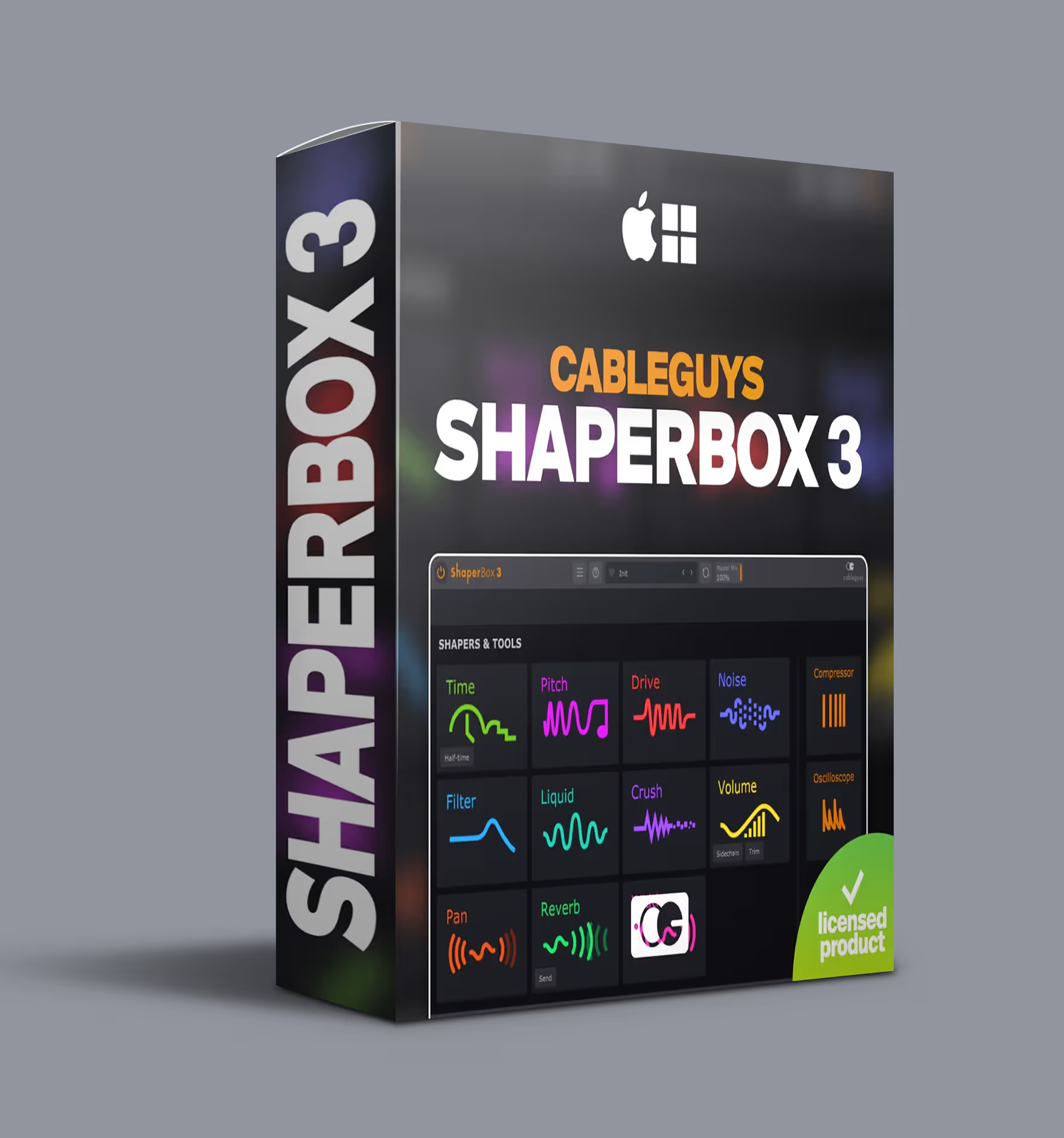
Cableguys ShaperBox 3 VST – 10 Shaper Effects Plugin
Cableguys ShaperBox 3 VST: 10 shaper effects plugin for rhythm, dynamics, and movement in your mix.
Original price was: $99.00.$59.00Current price is: $59.00.
Description
A synth line that stays static after the first bar. A drum loop that never evolves. A vocal hook that could cut through — if only you had the right rhythmic filter sweep. Standard LFOs offer sine, triangle, square. They never quite match the groove you actually hear. Cableguys ShaperBox 3 VST closes that gap.
Instead of choosing a waveform from a dropdown, ShaperBox 3 lets you draw exactly how each parameter moves over time. Every shaper effect responds to the curves you draw — ramps, gates, random patterns, or anything in between. Modulation follows your arrangement, not the other way around.
ShaperBox 3 VST: Ten Shapers, One Plugin
ShaperBox 3 bundles ten dedicated effects — called shapers — into a single interface. Each shaper focuses on a specific type of modulation. You can run multiple shapers in parallel, chain them in series, or use just the ones you need.
Volume & Time
VolumeShaper handles rhythmic volume modulation, gating, and tremolo by letting you draw the amplitude envelope. Want a kick that fades in over two bars? Draw a ramp. Need a hi-hat pattern gating on sixteenth notes? Draw the gate shape. Its envelope follower makes the shaper react to input dynamics rather than a fixed LFO.
TimeShaper manipulates playback speed and direction through drawn curves. Tape-stop effects, stutter, and reverse all originate from these curves. Timing locks to your DAW tempo, so every effect lands on the beat.
Filter & Stereo
FilterShaper modulates filter cutoff and resonance with drawn shapes. Vintage-style filters (LP, HP, BP) and modern variations are available. Draw a curve that oscillates between open and closed for a classic sweep, or open the filter on every second snare hit for accent control.
PanShaper and WidthShaper handle stereo positioning. PanShaper moves audio across the field with auto-pan that follows your drawn curve. WidthShaper narrows or widens the image — useful for verse/chorus contrast or adding motion to pad sounds.
Drive, Pitch & Crush
DriveShaper applies rhythmic saturation that pulses with your drawn shape. A slow sine adds subtle warmth that breathes with the bar. Faster shapes create distortion hitting on specific beats — ideal for accenting transitions or drops.
PitchShaper handles pitch modulation and vibrato with tuned wobbles, descending bends, or rhythmic detuning. Unlike manual pitch automation, PitchShaper syncs to tempo so every shift lands on the grid.
CrushShaper applies bit-crushing and sample-rate reduction following your drawn shape. Use it on drum busses for verse/chorus contrast: clean during verses, crushed during builds, back to clean on the drop.
Reverb & Faze (New in ShaperBox 3)
ReverbShaper modulates reverb decay and density over time. Draw a shape that opens reverb on specific words in a vocal line or closes it during percussive sections. FazeShaper modulates phaser and flanger movement with drawn curves, giving precise control over sweep speed and depth.
Audio Triggering & Envelope Following
ShaperBox 3 includes audio triggering mode — sidechain a shaper to a drum bus, vocal track, or any audio source. Each kick hit triggers a filter sweep. A snare hit opens a volume gate. Vocal phrases trigger pitch drops as the sidechain processes them. This creates interaction between elements without manual editing.
The envelope follower maps the input signal’s amplitude envelope to the shaper parameter, so a vocal with dynamic variation produces shaping that mirrors the peaks and valleys of the performance. The effect feels organic rather than mechanical.
For a breakdown of how drawable modulation compares to traditional LFO-based effects, Sound On Sound covers how rhythmic processing changes the perception of groove in a mix.
✅ What’s Included
- ✅ VolumeShaper — drawable volume modulation, gating & tremolo
- ✅ TimeShaper — tape-stop, stutter & reverse effects synced to tempo
- ✅ FilterShaper — drawable filter cutoff & resonance modulation
- ✅ PanShaper & WidthShaper — stereo positioning and width control
- ✅ DriveShaper — rhythmic saturation and harmonic drive
- ✅ PitchShaper — tuned pitch modulation and vibrato
- ✅ CrushShaper — bit-crushing and sample-rate reduction
- ✅ ReverbShaper — reverb decay and density modulation (new in v3)
- ✅ FazeShaper — phaser and flanger modulation (new in v3)
- ✅ Audio triggering & envelope follower — sidechain any shaper to audio
- ✅ VST3, AU & AAX formats — works in every major 64-bit DAW
- ✅ Mac & Windows — Intel & Apple Silicon native
- ✅ Royalty-free — use in commercial releases with no restrictions
Frequently Asked Questions
Q: What DAWs does ShaperBox 3 work with?
A: ShaperBox 3 supports VST3, AU, and AAX formats. It works in Ableton Live, FL Studio, Logic Pro, Cubase, Studio One, Pro Tools, Reaper, Bitwig, Nuendo, and any 64-bit DAW that accepts these formats.
Q: Does it run natively on Apple Silicon?
A: Yes, ShaperBox 3 runs natively on Apple Silicon (M1, M2, M3, M4) without Rosetta. Intel Macs and Windows 10+ (64-bit) are fully supported.
Q: What’s new in ShaperBox 3 compared to ShaperBox 2?
A: Version 3 adds ReverbShaper and FazeShaper, audio triggering mode, an improved envelope follower, a redesigned interface, and numerous workflow improvements across all shapers.
Q: Can I draw my own LFO shapes?
A: Yes — that’s the core concept. Every shaper lets you draw custom modulation curves rather than selecting from preset waveforms. You can create ramps, gates, random patterns, or precise rhythmic shapes, all synced to your DAW tempo.
Q: Can I use multiple shapers at once?
A: Absolutely. You can run shapers in parallel, chain them in series, or use individual shapers independently. The plugin handles routing internally.
Q: Can I use ShaperBox 3 on commercial releases?
A: Yes, 100% royalty-free. Use it on streaming platforms, sync licensing, YouTube content, client projects, or personal work. No additional fees or reporting required.
Who ShaperBox 3 Is For
Electronic and dance music producers who rely on rhythmic modulation as a core element of their sound will find ShaperBox 3 replaces several plugins at once. Mixing engineers can get automation-style effects without writing lanes of clip automation. Sound designers gain precise control over how parameters move across time. Producers working in hip-hop, pop, and hybrid genres where movement defines the arrangement will also find it fits their workflow naturally.
Pair ShaperBox 3 with our VST plugin collection for a complete processing chain covering both modulation and traditional dynamics control. For more mixing insights, visit Sound On Sound.
Reviews
There are no reviews yet.