

Synchro Arts VocAlign 6 Pro WINDOWS
Synchro Arts VocAlign 6 Pro provides professional vocal alignment, pitch correction, and formant shifting for Windows. Industry-standard tool for tight vocal productions with SmartAlign technology.
Original price was: $340.00.$60.00Current price is: $60.00.
Description
Synchro Arts VocAlign 6 Pro: Professional Vocal Alignment and Pitch Correction for Windows
Perfect vocal alignment and pitch correction are essential for professional-sounding vocal productions, but manual editing of multiple vocal takes can be time-consuming and technically demanding. The Synchro Arts VocAlign 6 Pro addresses this challenge by providing industry-standard vocal alignment technology that automatically synchronizes lead vocals, harmonies, doubles, and other vocal elements with precision and musical intelligence. This professional tool saves hours of manual editing while delivering results that sound natural and musical rather than mechanically processed.
Designed specifically for Windows systems, VocAlign 6 Pro builds on decades of development in vocal processing technology, offering both the core alignment capabilities that made VocAlign famous and advanced new features for pitch correction, formant shifting, and group processing. Whether you’re working on tight pop productions, natural-sounding folk recordings, or complex vocal arrangements, VocAlign 6 Pro provides the tools to achieve professional vocal alignment with workflow efficiency.
🎤 What Makes VocAlign 6 Pro Special
Core Alignment Technology and Workflow
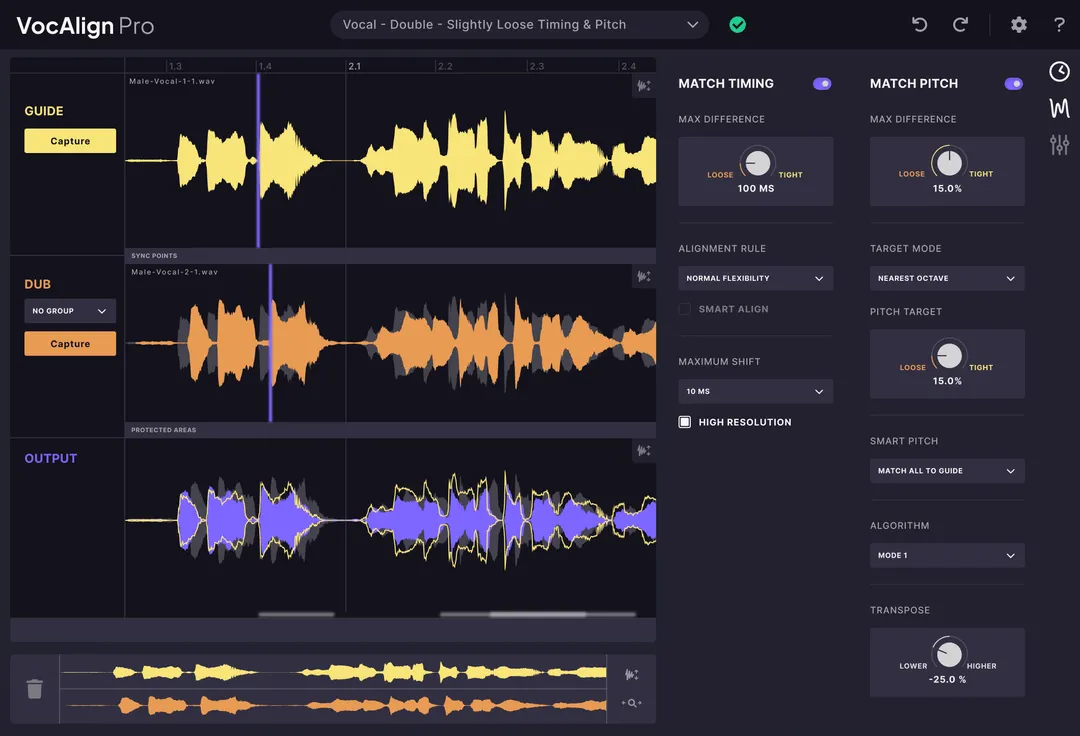
VocAlign 6 Pro’s primary function is aligning vocal performances to a reference track. The process is straightforward: you designate a “guide” track (typically the lead vocal or a timing reference) and one or more “dub” tracks (harmonies, doubles, ad-libs, etc.). The plugin analyzes the guide track’s timing and phrasing, then automatically adjusts the dub tracks to match. This alignment happens at the phrase level, preserving the natural flow and expression of the performance while ensuring precise synchronization.
The SmartAlign technology provides intelligent analysis that distinguishes between intentional timing variations (like rubato or expressive phrasing) and inconsistencies that need correction. This musical intelligence prevents the over-processing that can make aligned vocals sound robotic or unnatural. The result is vocals that sound tight and professional while maintaining the human feel that makes vocal performances compelling.
Advanced Pitch Processing Capabilities
Beyond timing alignment, VocAlign 6 Pro includes comprehensive pitch processing tools. The pitch alignment feature synchronizes pitch between vocal takes, ensuring harmonies and doubles match the lead vocal’s pitch contour. SmartPitch technology provides intelligent pitch correction that can be applied subtly for natural sound or more aggressively for contemporary pop effects.
The pitch processing maintains musical relationships between notes rather than simply quantizing to a scale, preserving the singer’s original intonation choices while correcting inconsistencies. This approach yields more musical results than generic pitch correction plugins, particularly for vocals with expressive pitch variations or stylistic vibrato. The pitch tools work independently or in conjunction with timing alignment, providing complete vocal processing in one integrated environment.
Ready to Perfect Your Vocal Productions?
Add Synchro Arts VocAlign 6 Pro to your Windows studio and achieve professional vocal alignment and pitch correction
Formant Shifting and Vocal Character Adjustment
Formant shifting allows adjustment of vocal characteristics without affecting pitch. This technology changes the resonant frequencies that give a voice its distinctive timbre, enabling creative effects like making a voice sound younger or older, more masculine or feminine, or simply different in character. Formant shifting works alongside pitch processing, allowing you to adjust vocal tone independently of melodic content.
Transpose shift provides key adjustment for vocal tracks, useful for matching vocals to different instrumental keys or creating harmonies at specific intervals. The transpose functionality maintains vocal quality through advanced processing that prevents the “chipmunk” or “demon” effects common with simple pitch shifting. This makes VocAlign 6 Pro valuable for music production scenarios where vocal keys need adjustment after recording.
Group Processing and Workflow Efficiency
One of VocAlign 6 Pro’s most significant workflow enhancements is its group processing capability. You can select multiple vocal tracks and process them simultaneously with consistent settings, dramatically reducing the time required for aligning complex vocal arrangements. This is particularly valuable for productions with multiple harmony parts, stacked doubles, or elaborate vocal productions where consistency across tracks is essential.
The Arm Capture All feature streamlines workflow further by allowing you to capture multiple tracks for alignment in a single operation. Combined with ARA (Audio Random Access) compatibility for seamless integration with supported DAWs, these workflow features make VocAlign 6 Pro not just a powerful processor but an efficient production tool that integrates smoothly into professional workflows.
Common Questions About VocAlign 6 Pro
How does VocAlign differ from manual vocal editing in a DAW?
Manual vocal editing involves cutting and moving individual words or syllables, which is time-consuming and can result in unnatural-sounding edits if not done meticulously. VocAlign analyzes the complete vocal performance and makes musical adjustments at the phrase level, preserving natural flow while achieving tight synchronization. This automated approach saves significant time and often yields more musical results than manual editing, especially for complex vocal arrangements.
What DAWs are compatible with VocAlign 6 Pro?
VocAlign 6 Pro supports VST and AAX plugin formats, making it compatible with most Windows DAWs including Cubase, Nuendo, Studio One, Reaper, FL Studio, and Pro Tools. ARA compatibility provides deeper integration with supported DAWs (check Synchro Arts website for current ARA compatibility list). The plugin includes two activations per license for flexibility across multiple workstations.
Can VocAlign be used for instruments other than vocals?
While optimized for vocals, VocAlign can process any monophonic audio material. Common non-vocal applications include aligning doubled guitar parts, synchronizing horn section recordings, timing correction for bass lines, and aligning other monophonic instruments where tight synchronization is desired. The algorithms are tuned for vocal characteristics but work effectively on other monophonic sources with similar spectral content.
What’s the difference between VocAlign Standard and Pro versions?
VocAlign 6 Pro includes all Standard features plus advanced capabilities: formant shifting, pitch alignment, SmartPitch technology, group processing, improved sync points, protected areas for preserving specific performance elements, and SynchroLink for integration with RePitch. The Pro version also includes two activations per license (Standard includes one). These additional features make Pro particularly valuable for professional studios and complex vocal productions.
Sync Points and Protected Areas
Sync points give you control over which parts of a performance receive the most aggressive alignment. You can place sync points at critical timing locations (downbeats, phrase beginnings, important consonants) to ensure precise alignment at these moments while allowing more flexibility elsewhere. This granular control helps maintain natural phrasing while ensuring tight synchronization where it matters most.
Protected areas allow you to exclude specific performance elements from processing. You might protect a particularly expressive vibrato, a stylistic timing variation, or a section that already sounds perfect. This selective protection prevents over-processing and preserves the best parts of a performance while correcting only what needs improvement. Combined with sync points, these features provide detailed control over the alignment process.
Professional Applications and Workflow Integration
VocAlign 6 Pro integrates into professional vocal production workflows at multiple stages. During tracking, it can be used to check alignment between takes in real-time. During editing, it dramatically reduces time spent on vocal comping and synchronization. During mixing, it ensures vocal elements work together cohesively. The resizable GUI adapts to different screen setups and workflow preferences, while comprehensive undo/redo functionality allows experimentation without risk.
Professional applications span all genres and production styles. Pop producers use VocAlign for tight, modern vocal productions. Country and folk engineers use it more subtly for natural-sounding alignment. Film and television composers use it for synchronizing dialogue replacement (ADR) and vocal elements in scores. The plugin’s flexibility allows adaptation to different aesthetic requirements, from invisible correction to obvious effect.
Transform Your Vocal Productions Today
Join professional engineers and producers worldwide who rely on VocAlign 6 Pro for precise vocal alignment and pitch correction
Educational Value for Vocal Production
Beyond practical processing, VocAlign 6 Pro serves as an educational tool for understanding vocal production principles. By observing how the plugin analyzes and adjusts vocal performances, you develop your ear for timing and pitch relationships. The visual feedback shows timing differences and pitch variations, helping you understand what makes vocal performances sound tight or loose, in-tune or pitchy.
The plugin also teaches about the balance between precision and naturalness in vocal production. By adjusting tightness controls and listening to results, you develop intuition about how much processing is appropriate for different musical styles and performance types. This understanding transfers to all aspects of vocal production, making you a better engineer regardless of the specific tools you use.
Additional Resources and Integration
To get the most from VocAlign 6 Pro, explore the tutorials and resources provided by Synchro Arts. The company offers comprehensive documentation, video tutorials, and user guides that demonstrate both basic operation and advanced techniques. The professional audio community also shares VocAlign tips and workflows, providing real-world insight into how the plugin fits into different production environments.
If you’re building a comprehensive vocal processing toolkit, VocAlign 6 Pro pairs well with other specialized tools. For additional vocal effects and processing, check out our selection of vocal enhancement plugins, or explore dedicated compressors, equalizers, and reverbs for complete vocal chain construction.
Whether you’re working on your first vocal productions or engineering professional releases, Synchro Arts VocAlign 6 Pro offers industry-standard vocal alignment with workflow efficiency that saves time while delivering professional results. Its combination of intelligent alignment, comprehensive pitch processing, and professional workflow features makes it more than just a plugin—it’s an essential tool for anyone serious about vocal production on Windows platforms.
Reviews
There are no reviews yet.